Security Guide: How to Defend Against MetaMask Browser Wallet Vulnerabilities?

Original Title: "Understanding How to Protect Yourself from the MetaMask Browser Wallet Security Vulnerability"
Original Source: DeFi Way
Note: In the early hours of June 16th, Beijing time, ConsenSys developer Dan Finlay disclosed a security vulnerability in the MetaMask browser extension wallet, which could potentially expose a small number of users' wallet funds to theft risk. In response to this issue, he provided some security recommendations.
Halborn's researchers discovered a scenario where, in very rare cases, unencrypted user keys could be found on disk. This issue has been addressed in version 10.11.3 of the MetaMask browser extension wallet and higher.
Background
Halborn's security researchers disclosed an instance where, under certain circumstances, the mnemonic phrase used by Web wallets such as MetaMask could be extracted from the compromised computer's disk.
The following content will not impact MetaMask mobile wallet users but will only affect a small number of MetaMask browser extension users and other browser/extension wallet users. We have implemented mitigations for these issues, so for users of version 10.11.3 and above of the MetaMask browser extension wallet, these should not be problems. Note that if all three of the following conditions apply to you, your wallet may be at risk, and you should read the following to understand the next steps:
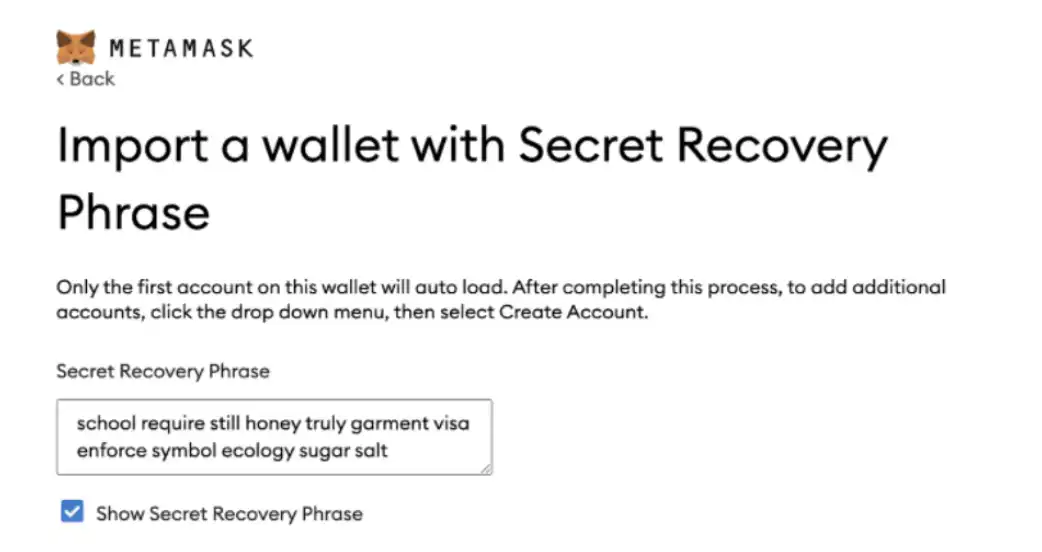
Your hard drive is not encrypted; you have imported the mnemonic phrase into the MetaMask browser extension wallet on a device owned by someone you do not trust, or your computer has been compromised. During the import, you used the 'Show Secret Recovery Phrase' checkbox to view your phrase on the screen. (As shown in the image below)
Impact
This will affect:
1. All desktop operating systems and browsers we tested;
2. We tested with Google Chrome, Chromium, and Firefox browsers on Windows, macOS, and Linux;
3. All versions of the MetaMask extension on all browser versions (prior to v10.11.3).
However, this vulnerability does not affect the MetaMask mobile wallet.
The mnemonic phrase will be eventually cleared, but we cannot guarantee when.
This vulnerability is most likely to affect users who had their devices compromised or stolen shortly after importing their mnemonic phrase into MetaMask.
If you meet all the above conditions, those who have had access to your computer may have obtained your mnemonic phrase, so you may want to consider moving your funds out of those accounts to ensure safety. We have prepared a guide to migrate your account funds, and the use of any third-party migration tool is at your own risk.
Note that individuals with physical access to your computer or malware may exploit this vulnerability for an attack, and if your device is compromised with malware, some attacks may be unstoppable (e.g., keyloggers, direct memory access, and code injection).
If You Believe You Are Vulnerable to This Attack
If your computer is at risk of being compromised by someone you do not trust, we recommend enabling "full-disk encryption" on your system. Additionally, if your funds are managed by a hardware wallet, you are not susceptible to this vulnerability.
Affected users should consider moving funds from the old wallet account to a new wallet account address.
The rest of this document will provide additional details and advice on how to best secure your wallet. We will disclose more details about the nature of the issue later so that other developers can avoid such issues themselves. However, for now, we are urging users to take precautions to minimize the risk of theft.
How Secure Am I?
As mentioned above, if your computer is compromised (whether physically or with malware), you cannot be certain of the security of any program running on that computer.
This is an issue that the popular password manager 1Password team has acknowledged and discussed, with 1Password's Chief Security Architect Jeffrey Goldberg explaining the difficulty of addressing the issue, he said:
“This is a well-known problem that has been discussed publicly many times before, but any seemingly reasonable solution may be worse than the problem itself.”
If you are using a password manager, you may be somewhat more secure than someone not using a password manager, but even with a password manager, vulnerability issues cannot be completely avoided.
Conclusion
Ultimately, we understand that the security of our password encryption feature is partly undermined by browser behavior. Because the browser itself considers physical access attacks beyond its threat model, and our current wallet is built on the browser, it turns out that reducing the scale of this attack surface would require a significant amount of effort and may not completely eliminate this attack. In the end, it is likely that only “full disk encryption” can provide strong physical access security for your computer.
In general, computers/browsers, etc., should temporarily or permanently store text input to some extent. However, due to how crucial it is to secure your mnemonic phrase, attention is needed in this specific scenario so that users can take appropriate action.
Fortunately, passwords still seem to provide some level of security. We have found that extracting the mnemonic phrase is only possible in very specific circumstances, and we have been able to introduce new protective measures within the time frame for disclosure by Halborn and plan to implement more protective measures to further mitigate this risk. This means that if you do not use your own wallet (or hand over your computer to someone else), locking the wallet is still a good practice.
Some key points:
1. Please take the time to enable full disk encryption on your computer. This is the only way to ensure that your computer's entire contents cannot be extracted by someone with physical access. We also recommend that users use a hardware wallet as an additional security measure.
2. Clear your browser's cache data (our research suggests that this may be helpful to some users in certain cases)
3. Remember, ensuring computer security is your responsibility, and if the system on which it runs is compromised, no wallet or software can guarantee its own security. Take the time to learn how to keep your computer free from malware.
Here are some guidelines to ensure the security of different operating systems:
Mac
iOS
Lastly, we want to thank Halborn's team for responsibly disclosing this issue and appreciate all the hard work they have done to protect this industry, we have awarded a $50,000 bounty for Halborn's findings.
Original Article Link
Welcome to join the official BlockBeats community:
Telegram Subscription Group: https://t.me/theblockbeats
Telegram Discussion Group: https://t.me/BlockBeats_App
Official Twitter Account: https://twitter.com/BlockBeatsAsia
 Related Articles