Slow Mist: Exposing How Malicious Browser Bookmarklets Can Steal Your Discord Account
Original title: "SlowMist: Exposing How Malicious Browser Bookmarks Steal Your Discord Token"
Original Author: Yao, SlowMist Security Team
Background
The world of blockchain follows the law of the dark forest. In this world, we may suffer from unknown external attacks at any time. Users do not do evil, but it is very necessary to understand how hackers do evil.
SlowMist Security Team has previously released the Blockchain Dark Forest Self-Help Manual
(https://github.com/slowmist/Blockchain-dark-forest-selfguard-handbook), which mentioned a lot about the Discord attack on the NFT project party In order to help readers have a clearer understanding of related phishing methods, this article will reveal one of the phishing methods, that is, to steal the Token of the Discord account of the project party through malicious bookmarks, and use it to publish false information to induce users to visit Phishing websites to steal users' digital assets.
Phishing incident
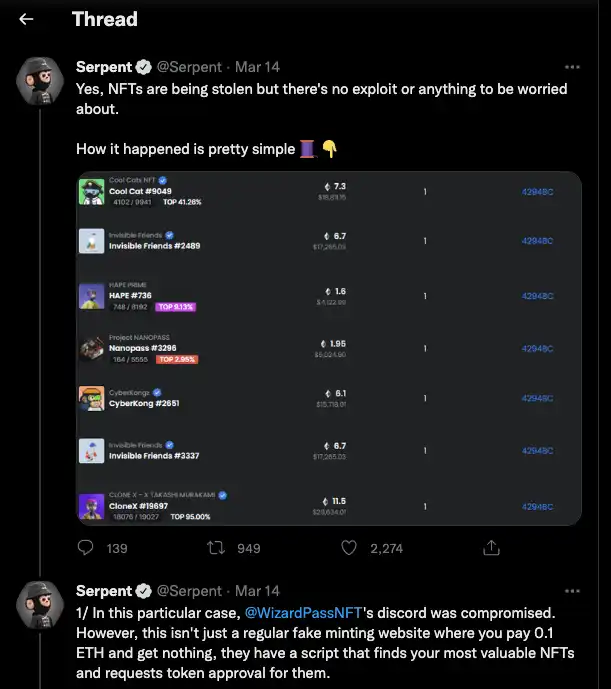
Let’s review a Discord phishing incident first: March 14, 2022, a tweet It is said that the Discord community of the NFT project Wizard Pass was invaded by scammers, which has caused NFTs such as BAYC, Doodles, and Clone X to be stolen. The details are as follows:
< /p>
(Source: https://twitter.com/SerpentAU/status/1503232270219431941)
Draw out one of the interpretations:

< /p>
(Source: https://twitter.com/sentinelwtf/status/1496293768542429187)
The bookmark mentioned in this interpretation is a browser bookmark. The content in this bookmark can be a piece of JavaScript malicious code. When a Discord user clicks, the malicious JavaScript code will be in the Discord domain where the user is located. Execution, stealing Discord Token, the attacker can directly and automatically take over the relevant permissions of the project party's Discord account after obtaining the Discord Token of the project party.
Background knowledge
To understand this event, readers need to have some background knowledge. Now browsers have their own bookmark managers. While providing convenience, it is also easy to be exploited by attackers. By carefully constructing a malicious phishing page, you can insert a piece of JavaScript code into your favorite bookmarks. When the victim clicks on the bookmark, it will be executed in the domain of the current browser tab.

< /p>
The above picture is an example, the victim opened the official website of discord.com, and clicked the malicious bookmark "Hello, World!" on this page to execute a pop-up statement, It can be found that the execution source shows discord.com.
There is a concept of domain here. Browsers have protection strategies such as the same-origin policy. It is reasonable that operations that do not belong to discord.com should not be in discord Pages on .com domains are responsive, but bookmarklets bypass this limitation.
You can foresee the hidden security issues of such a small function of bookmarks. The bookmark URL will be clearly seen in the normal way of adding bookmarks:

< /p>
Readers with a little security awareness should directly see that there is an obvious problem with the URL information.
Of course, if it is a good structure to induce you to drag and drop the collection to the bookmark bar to the page? You can see that the demonstration video in the twitter link has constructed such an induction page: "Drag this to your bookmarked".

< /p>
That is, you can add a link to the bookmark bar by dragging a link. As long as the phishing script is written enough, it is easy for users with insufficient security awareness to be tricked.
To add to the bookmark bar by dragging and dropping, you only need to construct an a tag, the following is the sample code:
1 <a href="javascript: (() => { alert('Hello, World! '); })();">
2 Hello, World!3 </a>
< /p>


Bookmarklets execute like code in the developer tools console when clicked, and bypass CSP (Content Security Policy) policies.

Readers may have doubts. After adding a link like "javascript:()" to the browser bookmark bar, the browser will not have any remind?

The author here uses Google and Firefox for comparison.

Using Google Chrome, drag and drop to add a normal URL link without any editing reminder.

< /p>

Using Google Chrome, dragging and dropping malicious links will also not have any editing reminders.

< /p>

If you use the Firefox browser, if you add a normal link, there will be no reminder.

< /p>

Using the Firefox browser, if you add a malicious link, a window will appear to remind the editor to confirm the save.

< /p>

It can be seen that Firefox browser has higher security in terms of adding bookmarks.

Scene demonstration

Google Chrome is used in the demonstration. On the premise that the user logs in to Discord on the web, it is assumed that the victim is guided by the phishing page A malicious bookmark is added, and when the bookmark is clicked on the Discord web terminal, the malicious code is triggered, and the victim's Token and other personal information will be sent to the attacker's channel through the Discord webhook set by the attacker.

The following is a demonstration of the victim clicking on the phished bookmark:

< /p>

The following is a demonstration of the JavaScript code written by the attacker to obtain Token and other personal information, and receive it through the webhook of the Discord Server.

< /p>

The author adds some attack details that may cause doubts:

1. Why did the victim get it after one click?

Through background knowledge, we know that bookmarks can insert a piece of JavaScript script, with which you can do almost anything, including encapsulation through Discord The good webpackChunkdiscord_app front-end package is for information acquisition, but in order to prevent the occurrence of evil, the author will not give the detailed attack code.

2. Why would the attacker choose Discord webhook for receiving?

Because the Discord webhook is formatted as
"https://discord.com/api/webhooks/xxxxxx" is directly the main domain name of Discord, bypassing issues such as the same-origin policy. Readers can create a new Discord webhook for testing.

3. What if I get the Token?

Obtaining the Token is equivalent to logging in to the Discord account, and you can do any equivalent operations of logging in to Discord, such as creating a Discord webhook robot, Posting false news such as announcements in the channel for phishing.

Summary

Attacks are happening all the time. For users who have suffered malicious attacks, it is recommended to take the following actions immediately to remediate b>:

1. Reset your Discord account password immediately.

2. After resetting the password, log in to the Discord account again to refresh the Token, in order to invalidate the Token obtained by the attacker.

3. Delete and replace the original webhook link, because the original webhook has been leaked.

4. Improve security awareness, check and delete malicious bookmarks that have been added.

As a user, it is important to note that any additions and code can be malicious, there are many extensions on the web Seems very friendly and flexible. Bookmarks cannot prevent network requests. At the moment when the user manually triggers the execution, it is still necessary to maintain a suspicious heart.

This is the end of this article, the SlowMist security team will reveal more attacks on the dark forest, hoping to help more people in the encrypted world people.
Original link

Welcome to join the official BlockBeats community:
Telegram Subscription Group: https://t.me/theblockbeats
Telegram Discussion Group: https://t.me/BlockBeats_App
Official Twitter Account: https://twitter.com/BlockBeatsAsia


 Related Articles