
Save 300 million tokens per week, Claude Code's caching guide
Original Article Title: How Anthropic Engineers Actually Save Tokens
Original Author: Nate Herk
Translation: Peggy, BlockBeats
Editor's Note: Many people's most intuitive feeling when using Claude Code is that Tokens are consumed too quickly, and long sessions easily exceed the quota. However, from the perspective of Anthropic engineers, what really affects costs is often not how much code you write, but whether the system continues to reuse previously processed contexts.
The core of this article is how to save Tokens through a caching mechanism. The author reused over 300 million Tokens within a week, with a daily cache amount of 91 million. Since the cost of caching Tokens is only 10% of inputting ordinary Tokens, this means that the actual billing for 91 million cached Tokens is equivalent to about 9 million ordinary Tokens. The reason why long sessions in Claude Code seem more "durable" is not because the model is working for free, but because a large amount of repeated context has been successfully reused.
The key to prompt caching is "do not interrupt the cache." Claude Code layers the caching of system prompts, tool definitions, CLAUDE.md, project rules, and historical conversations; as long as the prefixes of subsequent requests remain consistent, Claude can directly read from the cache instead of reprocessing the entire context. Internally, Anthropic also monitors the prompt cache reuse rate because it not only affects user quotas but is also directly related to model service costs and operational efficiency.
For ordinary users, there is no need to understand all the underlying details, just a few key habits to master: do not leave sessions idle for more than 1 hour; perform session handoff when switching tasks; avoid frequent model switches; for large documents, try to place them in Projects instead of repeatedly pasting them into conversations.
This article is more about providing a set of Claude Code usage methods that are closer to an engineer's mindset than simply discussing a Token-saving technique: treat context as asset management, keep the cache in continuous reuse, and minimize redundant calculations in long sessions.
The following is the original text:
This week, I saved 300 million Tokens, with 91 million in a single day, and over 3 billion in a week.
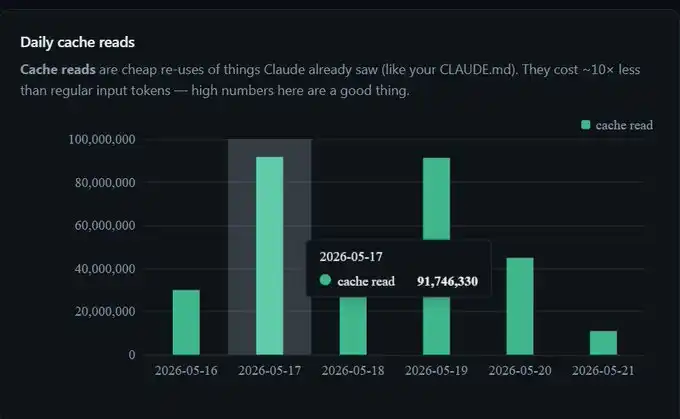
I haven't changed any settings. This is just prompt caching working as intended in the background.
However, once I truly understood what caching is and how to avoid "breaking" the cache, my session could last longer under the same usage quota. So, here's an 80/20 guide to Claude Code prompt caching, excluding in-depth API details.
TL;DR
The cost of caching a Token is only 10% of the regular Token input. Caching 91 million Tokens results in a bill equivalent to processing around 9 million Tokens.
The cache TTL for Claude Code's Subscription Version is 1 hour; API default is 5 minutes; Sub-agent is always 5 minutes.
The cache is divided into three layers: system, project, and session.
A mid-session model switch disrupts the cache, including enabling the "opus plan" mode.
How Is Cache Priced?
Every cached Token incurs a cost equivalent to 10% of the regular Token input.

So, when my dashboard shows that 91 million Tokens were cache hits in a day, the actual billing is approximately equivalent to processing 9 million Tokens. This is also why compared to no caching, extended use of Claude Code can make the session feel almost "freely" extended.
There are two key numbers in the dashboard worth paying attention to:
Cache create: One-time cost incurred when writing content to the cache. It will take effect in the next dialogue round.
Cache read: Tokens reused by Claude from the cache, such as your CLAUDE.md, tool definitions, previous messages, etc. It is 10 times cheaper compared to reprocessing as input.
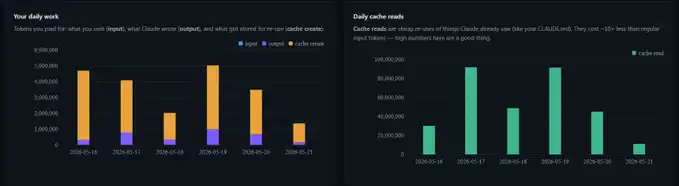
If your Cache read number is high, it means you are effectively utilizing the cache; if it is low, it indicates you are repeatedly paying for the same context.
Thariq from Anthropic had a saying that left a deep impression on me: "We actually monitor the prompt cache hit rate, and once the hit rate is too low, it triggers an alert, even declaring a SEV level incident."
He also wrote a great X article. When the cache hit rate is high, four things happen at the same time: Claude's Code feels faster, Anthropic's service costs decrease, your subscription quota appears more durable, and long coding sessions become more realistic.
But if the hit rate is very low, everyone suffers.
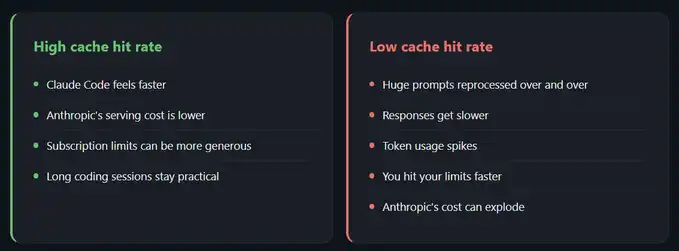
So, the incentives for both parties are actually aligned: Anthropic wants your cache hit rate to be higher, and you also want a higher hit rate. The only real hindrance comes from some seemingly insignificant habits that quietly reset the cache.
How does the cache grow in each round of dialogue?
The cache relies on prefix matching.
Without delving too deep into technical details, you only need to understand one thing: as long as the content before a certain point matches exactly with the cached content, Claude can reuse that part of the cached token.
A typical new session unfolds as follows:
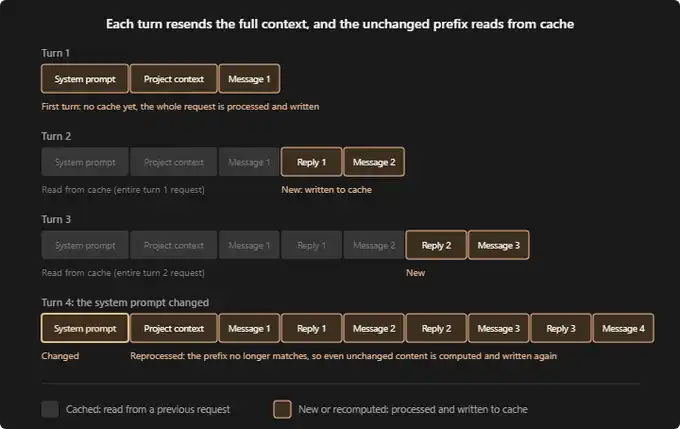
According to the Claude Code documentation, a new session typically runs like this:
First round of dialogue: There is no cache yet. System prompts, your project context (such as CLAUDE.md, memory, rules), and your first message will all be reprocessed and written into the cache.
Second round of dialogue: Everything from the first round is now cached. Claude only needs to process your new reply and the next message. The cost for this round will be much lower.
Third round of dialogue: The logic remains the same. Previous dialogues are still held in the cache, and only the latest round of interaction needs to be reprocessed.
The cache itself can be divided into three layers:
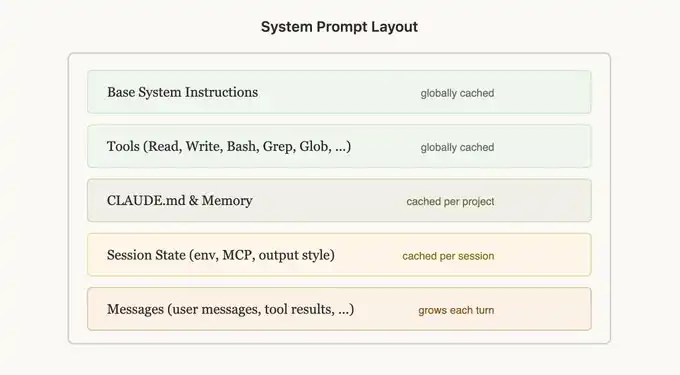
From Thariq's X article:
System layer: Includes basic instructions, tool definitions (read, write, bash, grep, glob), and output style. This layer is globally cached.
Restart Directly When Switching Tasks
/compact or /clear already destroys the cache, so it's better to take this opportunity to truly reset at this point.
I created a session handoff skill myself to replace /compact. It summarizes what we have accomplished, pending decisions, key files, and where we should continue from. Then I run /clear, paste this summary, and can continue pushing forward as if nothing was interrupted.
Sometimes the compact command runs very slowly. This handoff skill usually completes in less than a minute.
In Claude Chat, Put Large Documents into Projects Whenever Possible
There isn't a very detailed official explanation of the cache mechanism on Claude.ai, but Projects obviously use a different optimization method compared to regular conversation threads. So, if you need to paste large documents, it's best to put them in a Project instead of directly into the conversation.
Which Actions Quietly Destroy the Cache?
There are several things that will quietly reset the cache without a clear warning.
Model switching: Because the cache relies on prefix matching, and each model has its own cache. Just by switching models, the next request will reread the entire history without any cache hits.
Opus plan mode: This setting uses Opus in the planning phase and Sonnet in the execution phase. I recommended it in some token optimization videos before, and for good reason. But it's important to understand that every plan switch is essentially a model switch, meaning a cache rebuild. In the long run, it still helps extend session duration, but you need to know what's happening under the hood.
Editing CLAUDE.md mid-session is permissible: This change won't take effect immediately; it will be applied on the next restart. Therefore, the current running cache will not be affected.
My Free Token Dashboard
The screenshot I showed earlier is from a token dashboard.

https://github.com/nateherkai/token-dashboard
This is a very simple GitHub repository. You hand the link to Claude Code to deploy it locally on localhost, and it will read all your past session records instead of starting from a blank state to calculate. Right from the start, you can see the daily input, output, cache create, and cache read data.
However, one thing to note: this dashboard calculates Token data on the local device. If you switch from a desktop to a laptop, the numbers will not be exactly the same. Each device has its own set of statistics views.
Summary
Prompt caching is something that can be studied in depth. Thariq's article covers it more comprehensively than here, so it's worth a read if you want the full picture.
But you don't need to fully understand all the details to benefit from it. You just need to grasp the key 80/20: caching Token is 10 times cheaper than regular Token; Claude Code's TTL is 1 hour; switching models will break the cache; handing over tasks between sessions is usually more cost-effective than letting an old session expire and then forcefully continuing to use it.
Welcome to join the official BlockBeats community:
Telegram Subscription Group: https://t.me/theblockbeats
Telegram Discussion Group: https://t.me/BlockBeats_App
Official Twitter Account: https://twitter.com/BlockBeatsAsia