Tutorial: Yuga Labs' Bitcoin NFT is here, learn how to mint Bitcoin NFTs first.
Today, Yuga Labs announced that it will launch a series of NFTs called TwelveFold on the Bitcoin blockchain based on the Ordinals protocol later this week. The series will include 300 limited edition generative art pieces designed and created by Yuga Labs' in-house art team. Although details of the public auction have not been revealed yet, as a top player in the small picture circle, Yuga Labs' foray into Bitcoin NFTs is definitely worth participating in. So, how to mint NFTs on the Bitcoin network based on the Ordinals protocol?
BlockBeats previously ran through the process of Bitcoin Punk minting and summarized it into a tutorial to share with everyone. It should be noted that the method described in this article is only a general method for minting NFTs using the current Ordinals protocol, and it is not ruled out that Yuga Labs will develop a simpler and more user-friendly frontend interface for Bitcoin NFT issuance. However, regardless of the situation, it is essential to establish a Bitcoin wallet and prepare enough sats in the wallet as transaction fees.
Establish Wallet
First, you need a Bitcoin address that can receive information. The Sparrow wallet is generally recommended. Let's set it up step by step. First, click to download the installation package that suits your PC environment. The following screenshots are from GitHub Gist, and BlockBeats did not encounter any obstacles after testing.
After installation is complete, name the wallet first, name it as you like, and click create.

Then change the script type to taproot (p2tr) and click on new or imported software wallet.

Select 12 mnemonic words, click "generate new" to automatically generate 12 words. Remember them well, as you will need to rewrite them later. Once you have memorized them, click "confirm backup".

Then click on create keystore.

Click import keystore.
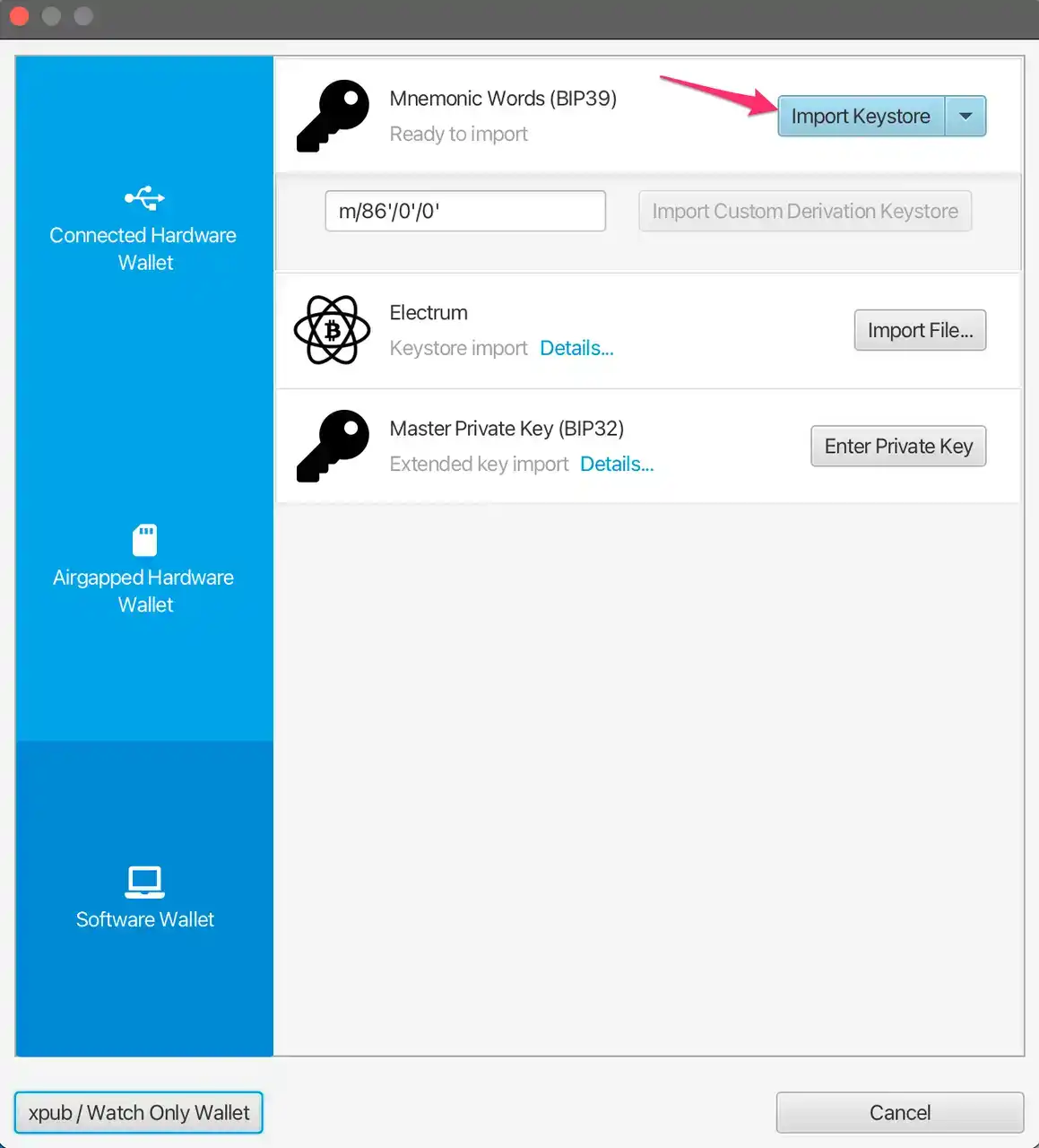
Then click apply. If you want to set a password for your wallet, you can do so.

This new Bitcoin wallet is now set up, and the address is your address, which will be needed when minting later.

Using bot
Generally speaking, this step requires a node, but obviously most people don't have it. Therefore, some developers have developed Ordinalsbot to facilitate everyone's use, mainly for text and image NFTs. The disadvantage is that this bot sometimes crashes. There will definitely be other bots online later, such as Gamma's bot, which has already been launched.
After completing the wallet setup, you need to go to the Bitcoin Punks official website to select an NFT that has not yet been minted (of course, you can also choose to use any image), select one, and write down the number. In the web browser, enter "https://cryptoPunks.app/public/images/cryptoPunks/Punk****(id number).png", right-click and save the image.
Login to the bot website and fill in the relevant information as indicated in the following image. It is recommended to set the transaction fee to the maximum to increase the success rate of forging. The cost will increase slightly and may be over 30 dollars during congestion.

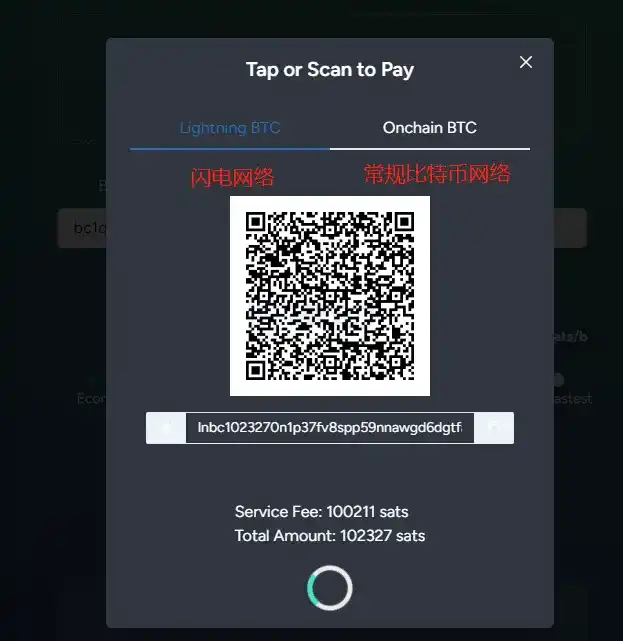
After clicking on "Generate Payment Invoice", a payment invoice code will pop up on the webpage. You can choose to pay through the Lightning Network or the regular Bitcoin network. In theory, the Lightning Network will be faster. After completing the payment, wait for the transfer confirmation. (Note: The payment wallet can be different from the wallet address that receives the NFT.)
After confirming the transfer, how can you check if the casting is successful? You can query it through the Bitcoin Punks official website by searching for the ID of the casting. Click the "ORD" link to enter the NFT details page on the Ordinals website. If your receiving address is displayed in the "address" section, congratulations, the casting was successful.

Attention
As previously mentioned in the article, the Ordinals protocol has a numbering scheme that supports tracking and transferring the smallest unit of Bitcoin, Satoshi. Different Satoshis are numbered in the order they are mined and are transferred from transaction inputs to transaction outputs in a first-in, first-out order. Once each Satoshi has a unique number as an identity, it can be tracked or traded individually. On this basis, data such as images, text, SVG, HTML, etc. can be written into each Satoshi, completing the transformation from a "Bitcoin minimum unit" to a "Bitcoin NFT".
Therefore, it can be said that the current Bitcoin NFT is stored on the UTXO that records transaction information. So after successfully minting a Bitcoin NFT, the UTXO that stores the NFT information needs to be frozen in the wallet to ensure that it will not be paid out in subsequent transfer processes.
Welcome to join the official BlockBeats community:
Telegram Subscription Group: https://t.me/theblockbeats
Telegram Discussion Group: https://t.me/BlockBeats_App
Official Twitter Account: https://twitter.com/BlockBeatsAsia
 Related Articles