Topping GitHub: The Ultimate Guide for Claude Code Users
Original Title: Karpathy's CLAUDE.md hit #1 on GitHub with 82,000 stars. Most devs still haven't read it.
Original Author: Dep
Editor's Note: When many people use Claude Code, the biggest issue is not that the model is not strong enough, but that they have to start from scratch every time.
You need to repeatedly explain the project background, tech stack, code standards, what should not be changed, what solutions have been tried before. As long as this information is not fixed, Claude will rely on guesswork, which may result in changing files that shouldn't be changed, refactoring code that didn't need refactoring, or even recommending tools that are not suitable for the current project.
The CLAUDE.md described in this article is a usage manual for Claude Code. You just need to place it in the project's root directory, and Claude will automatically read it each time it starts. It can inform Claude in advance: how to respond, how to write code, when to ask first, which operations cannot be performed arbitrarily, what tech stack the project uses, and what important decisions have been made in the past.
In simple terms, the purpose of CLAUDE.md is to: reduce redundant explanations, limit model overreach, and make AI programming more stable and controllable.
If you are using Claude Code, you can start with the 4 rules summarized by Karpathy: Ask if unsure, do the simplest thing first, avoid irrelevant code, explicitly state uncertainties. Write these rules in CLAUDE.md, then gradually add more based on your project to significantly improve the user experience.
The following is the original text:
A file named CLAUDE.md has reached the top of GitHub Trending.
82,000 stars, 7800 forks.
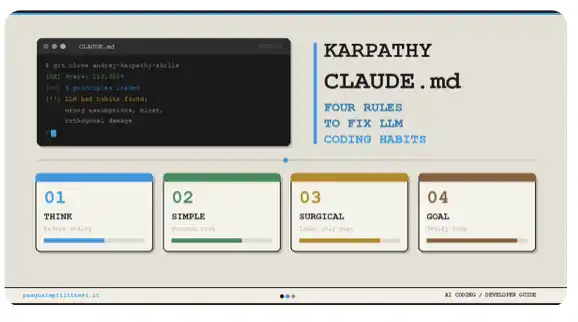
It all started with Andrej Karpathy. He was formerly the head of AI at Tesla and one of the founding members of OpenAI. He summarized 4 behaviors that would cause Claude Code to fail and wrote them into a file.
Later, a developer further expanded on these 4 rules and publicly released the file. As a result, it quickly went viral.
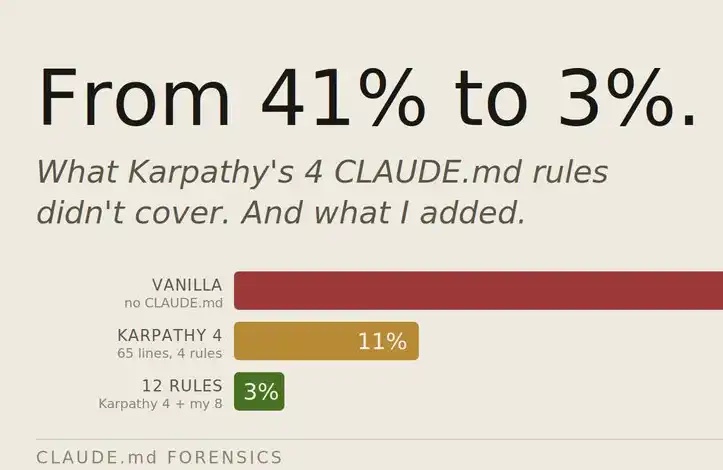
The reason is very straightforward: the coding accuracy has improved from 65% to 94%.
However, most developers who use Claude Code daily have never done this setup. They start from scratch every time: re-explaining the same context, cleaning up unnecessary scope changes, rolling back refactors that no one asked for.
Here is the full document.
The Setting Most Developers Miss
Every time you open Claude Code, it knows nothing by default.
It doesn't know your tech stack, your code style, your project background, or what you've already tried, let alone the three things you decided not to do before the third session.
So it can only guess. And once it starts guessing, it may refactor code you didn't ask it to touch, suggest frameworks that would break the existing architecture, delete files without confirmation, or even undo decisions you've made before.
CLAUDE.md is a plain text file placed in the project's root directory. Claude Code will automatically read it at the start of each session.
One setup, no need to re-explain, and can fix three types of costly mistakes.
Default Setting: You Spend $375 a Week Just Re-explaining Yourself
An average developer spends about 30 minutes a day re-explaining the context to Claude.
Tech stack, coding style, project background, methods already tried—unless you write down this information once and have Claude read it automatically each time, they won't persist between different sessions.
If we calculate based on a developer's hourly rate of $150:
· 30 minutes a day is $75;
· That's $375 per week.
· For a team of 5, that's an implicit cost of $1875 per week.
The following 7 rules should be placed at the very beginning of the CLAUDE.md file.
→ Cut the small talk
Avoid starting your response with phrases like "Good question," "Of course," or "No problem." Provide the answer directly without preamble. Avoid pleasantries and refraining the question.
→ Tailor the answer length to the task
Match the length of your answer to the complexity of the task. For simple questions, provide direct and concise answers; for more complex tasks, offer a complete and detailed explanation. Avoid padding your response with restating the question or repeating the conclusion.
→ Provide a plan before taking action
Before initiating any significant task, present 2–3 viable paths, and proceed once I make a selection.
→ Acknowledge uncertainty before potential losses
If you are unsure about any fact, data, date, or technical information, explicitly state your uncertainty before referencing it. Do not attempt to fill knowledge gaps with seemingly reasonable information. When in doubt, simply state that you are uncertain.
→ Who Am I, What Do I Know
About Me: [Name] / Role: [Your Role] / Background: [Field].
I Excel At: [Your Area of Expertise].
I'm Still Learning: [Areas of Knowledge Gap].
Adjust the depth of each response based on this information. Avoid over-explaining things I already know, and don't skip the background information I need.
→ Current Project Context
I'm Working On: [Project Name] / Objective: [Specific Result] / Audience: [Who Will Use It] / Tech Stack Background: [Relevant Constraints] / Things to Avoid: [List].
Apply this context to every task. If a requirement doesn't align with this context, highlight it before proceeding.
→ Lock in Your Writing Style
My Writing Style Is: [Describe Your Writing Style].
Sentence Length: [Preference].
Words I Commonly Use: [Examples].
Words I Never Use: [Examples].
Format: [Freeform or Structured].
Whenever you write on my behalf, ensure it strictly adheres to this style. Avoid defaulting to your own expression patterns.
Time Allowed for Daily Context Recap: 30 minutes
Based on a developer hourly rate of $150: $75/day
Per Week: $375 per developer
Team of 5: $1875 per week
This section CLAUDE.md Setting Time: Total 45 minutes
Errors to Avoid: Do not write CLAUDE.md from scratch. Start by using the prompt below, then edit the output:
Based on what I've told you about myself, my project, and how I like to work, please write a full CLAUDE.md file for me. Include: who I am, my technical background, my communication preferences, and the default behavior to follow in each session. Be specific, plain text, and under 500 words.
Behavior Constraint: Changes not authorized under the " $150 per hour" rate
You asked Claude to fix a function.
Instead, it refactored three files, renamed variables, reorganized imports, and even rewrote comments you had taken the time to write.
All of this without your approval.
To review and roll back these unnecessary changes may take 1 hour, equivalent to $150. This happens three times a week, totaling $450. For a 5-person team, that's $2250 per week to clean up unauthorized alterations.
The following 7 rules should go into the behavior constraint section of CLAUDE.md.
→ Strict Scope Control
Only modify files, functions, and lines of code directly related to the current task. Do not refactor, rename, restructure, reformat, or "optimize" any content that I have not explicitly requested you to change.
If you find other areas worth fixing, make a note at the end. Leave it alone, forever.
→ Seek Approval for Major Changes
Before making significant modifications to content I have already created, such as rewriting sections, deleting paragraphs, restructuring, changing the tone, etc., you must stop and clearly explain what you intend to change and why. Wait for my confirmation before proceeding.
→ Confirmation Required for Destructive Actions
Before deleting any files, overwriting existing code, deleting database records, or removing dependencies, you must pause, list out specifically what will be affected, and ask for my explicit confirmation. Only proceed if I say "yes" in the current message.
Simply mentioning "you mentioned before" does not equal confirmation.
→ Production environment operations must be forcibly paused
The following operations must receive explicit confirmation in the current session without exception:
· Deployment to any environment;
· Running migrations or making database schema changes;
· Making any external API calls;
· Executing any command with irreversible side effects.
· I must explicitly say "yes" in the current message.
→ Always show what changed
After completing any coding task, the conclusion must include:
Modified files: List all files that were touched;
Changes made: Summarize each file in one sentence;
Files intentionally not modified;
Follow-up items to address.
→ Do not act on my behalf without explicit confirmation
Without my explicit confirmation in the current message, you are not authorized to send, release, share, or arrange any content on my behalf. This includes emails, calendar invites, document sharing, or any actions taking place outside of the current conversation. I must explicitly say "yes" in the current message.
→ Think before coding
For tasks involving architecture decisions, complex problem debugging, or non-trivial feature development, break down the problem step by step before writing code. Present your reasoning, highlight areas of uncertainty, and then proceed.
Weekly rollback due to unnecessary scope changes: $150
Weekly manual diff check: $75
Developer behavior-related waste per week: $225
5-person team: $1125 per week
CLAUDE.md behavior section setup time: 30 minutes
Memory and Tech Stack: Making Claude Code Truly Reliable
Claude forgets everything between different sessions.
Every decision you've made, every plan that has failed, why you chose Prisma over Drizzle six months ago, and why a certain constraint came from a specific client request—it will all be forgotten.
And then, it will reintroduce solutions you had long dismissed.
This part serves as providing Claude with the closest thing to "true memory" at present, while locking in your tech stack to prevent it from continuing to suggest tools that would disrupt the existing architecture.
→ MEMORY.md Decision Log
Maintain a file named MEMORY.md in the project. Every time a significant decision is made, add a new entry:
· What was decided;
· Why the decision was made this way;
· What was ruled out and why.
At the beginning of each session, read MEMORY.md. Without a reminder, decisions should not conflict with those already documented.
→ Session End Summary
When I say "session end," "wrapping up," or "let's stop here," please write a session summary in MEMORY.md, including:
· What was covered in this session;
· What has been accomplished;
· What is still in progress;
· What decisions were made;
· Priorities for the next session.
→ ERRORS.md Failure Log
Maintain a file named ERRORS.md. When a particular solution has been attempted more than twice without success, record:
· What did not work;
· What eventually worked;
· What to watch out for next time.
Before proposing a solution for a similar task, check ERRORS.md.
→ Immutable Facts List
The following facts are always true for this project and must be consistently applied in every session:
[Your Permanent Constraints, Architecture Decisions, and Rules]
If a task conflicts with these facts, please point it out before execution.
→ Locked-in Tech Stack
The project's tech stack is as follows, always use these tools. Unless explicitly requested by me, do not recommend alternative solutions:
Language: [e.g., TypeScript]
Framework: [e.g., Next.js 14]
Package Manager: [e.g., pnpm]
Database: [e.g., PostgreSQL with Prisma]
Testing: [e.g., Vitest]
Styling: [e.g., Tailwind CSS]
If a tool seems inappropriate, feel free to point it out. However, unless I explicitly state, the defined tech stack must be used.
→ Enable Critical Thinking on Tough Decisions
For issues involving system architecture, performance trade-offs, database design, or long-term technical decisions, please use critical thinking mode.
Break down the problem step by step, suggest trade-offs I may not have considered, highlight assumptions that may not hold at scale, and then provide your recommendation.
→ The 4 Cardinal Sins
Karpathy summarized 4 behaviors that would cause Claude Code to fail. A developer distilled them into the following 4 rules. Coding accuracy subsequently increased from 65% to 94%.
Ask First, Do Not Assume.
If anything is unclear, ask before writing the first line of code. Do not make silent assumptions about intent, architecture, or requirements.
Do the Simplest Thing First.
Always implement the simplest solution that works. Do not introduce unrequested abstraction layers or flexibility.
Do Not Touch Unrelated Code.
If a file or function is not directly related to the current task, do not modify it. Even if you believe it can be optimized, do not touch it.
Clearly Flag Uncertainties.
If you are unsure about a solution or technical detail, state it before proceeding. Displaying confidence without certainty causes more damage than admitting a knowledge gap.
·Weekly Cost of Recovery due to Forgetful Decisions and Erroneous Advice: $300 per developer
·Incorrect Technology Stack Recommendations and Incompatible Tools: $75 per week
·Memory-related Waste per Developer: $375 per week
·Team of 5: $1875 per week
·MEMORY.md + ERRORS.md + Tech Stack Setup Time: 20 minutes
Conclusion
The complete cost breakdown is as follows:
·Weekly Repetitive Context Explanation: $375
·Weekly Rollback of Unauthorized Changes: $225
·Weekly Addressing Issues Arising from Forgetful Decisions: $375
·Total Weekly Waste per Developer: $975
If it's a 5-person development team: $4875 per week. $253,500 per year.
While the configuration of CLAUDE.md only requires a total of 2 hours.
Just Karpathy's 4 rules alone increased coding accuracy from 65% to 94%.
A plain text file, 21 rules, and two hours of work.
The developer who completes this setup is, in fact, using a more reliable Claude: one that remembers decisions, controls the scope of tasks, requests confirmation before destructive operations, and does not recommend frameworks that would disrupt the existing architecture.
Those who have not set it up yet are still spending $975 per week reiterating themselves.
Footnote: Start with Karpathy's 4 rules. Just these 4. Paste them now into a new file named CLAUDE.md at the project root, only taking 2 minutes. Then gradually add more based on the gaps you discover each week.
Before it gets lost in the information flow, bookmark it. If you find it useful, feel free to share it with someone who truly needs it.
Welcome to join the official BlockBeats community:
Telegram Subscription Group: https://t.me/theblockbeats
Telegram Discussion Group: https://t.me/BlockBeats_App
Official Twitter Account: https://twitter.com/BlockBeatsAsia
 Related Articles