
Proper Handling of Context in Claude Code: Avoiding Longer Sessions, Smarter Models
Original Title: Using Claude Code: Session Management & 1M Context
Original Author: Thariq, Claude Code Team Member
Translated by: Baoyu, AI Researcher
Rhythm BlockBeats Note: In the current environment where AI programming tools are constantly "expanding the window," many users mistakenly believe that the larger the context, the better the experience will naturally be. However, this firsthand retrospective from a Claude Code researcher provides a more sobering answer: what truly determines output quality is not the window size itself, but how you manage it.
From the release of /usage updates to the breakdown of micro-operations such as "continue, rewind, compress, clear, sub-agent," the article reveals a frequently overlooked capability—context scheduling ability. It is both an engineering problem and a cognitive problem: when to retain history, when to actively forget, when to separate tasks, and when to start afresh. These choices directly determine whether AI is "collaborating" or "hindering." The following is the original content:
Today, we have rolled out a brand new update for the /usage command, aimed at helping you better understand your usage in Claude Code. Behind this decision is our recent in-depth conversations with users.
In these conversations, we have repeatedly heard about a phenomenon: everyone's session management habits vary widely. Especially since Claude Code recently upgraded the context window to the 1 million mark, these differences have become even more apparent.
Are you used to keeping only one or two open sessions in the terminal? Or do you start a new session every time you enter a prompt word? When do you usually use compression, rewind, or sub-agents? What caused a bad compression experience?
There is actually a lot to learn here. These seemingly insignificant details have a significant impact on your experience with Claude Code. And at the core of all this is one thing: how you manage your context window.
Quick Primer: Context, Context Compression, and Context Decay
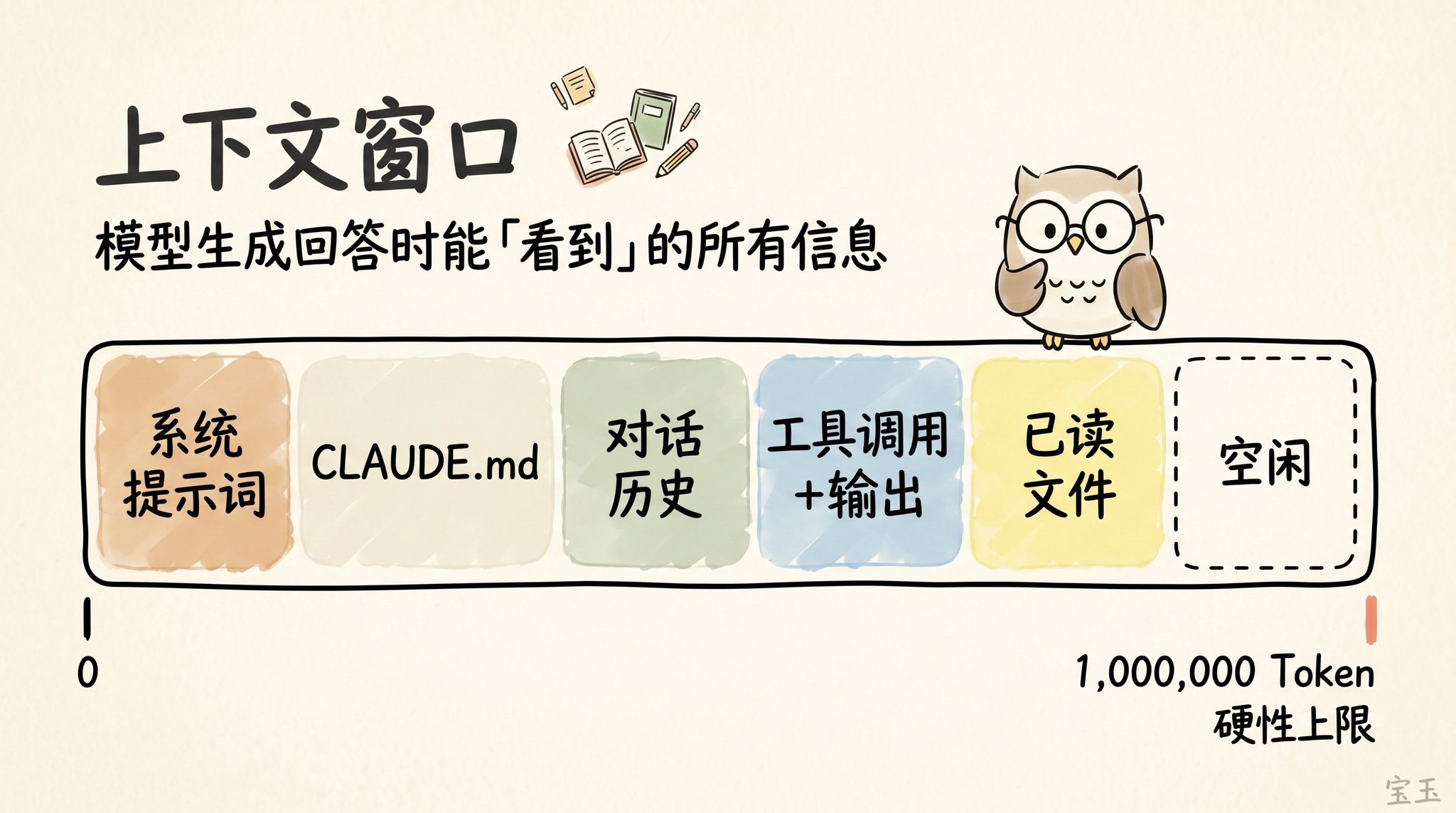
The so-called "Context Window" is like the view the model has of all available information when generating the next response. It includes your system prompt, the chat history up to that point, each tool call and its output, and even every file it has read. Now, Claude Code has an extensive Context Window of up to 1 million tokens (Note: A token is the basic unit of text the large model processes, typically one English word is about 1 token, and one Chinese character may be 1-2 tokens).
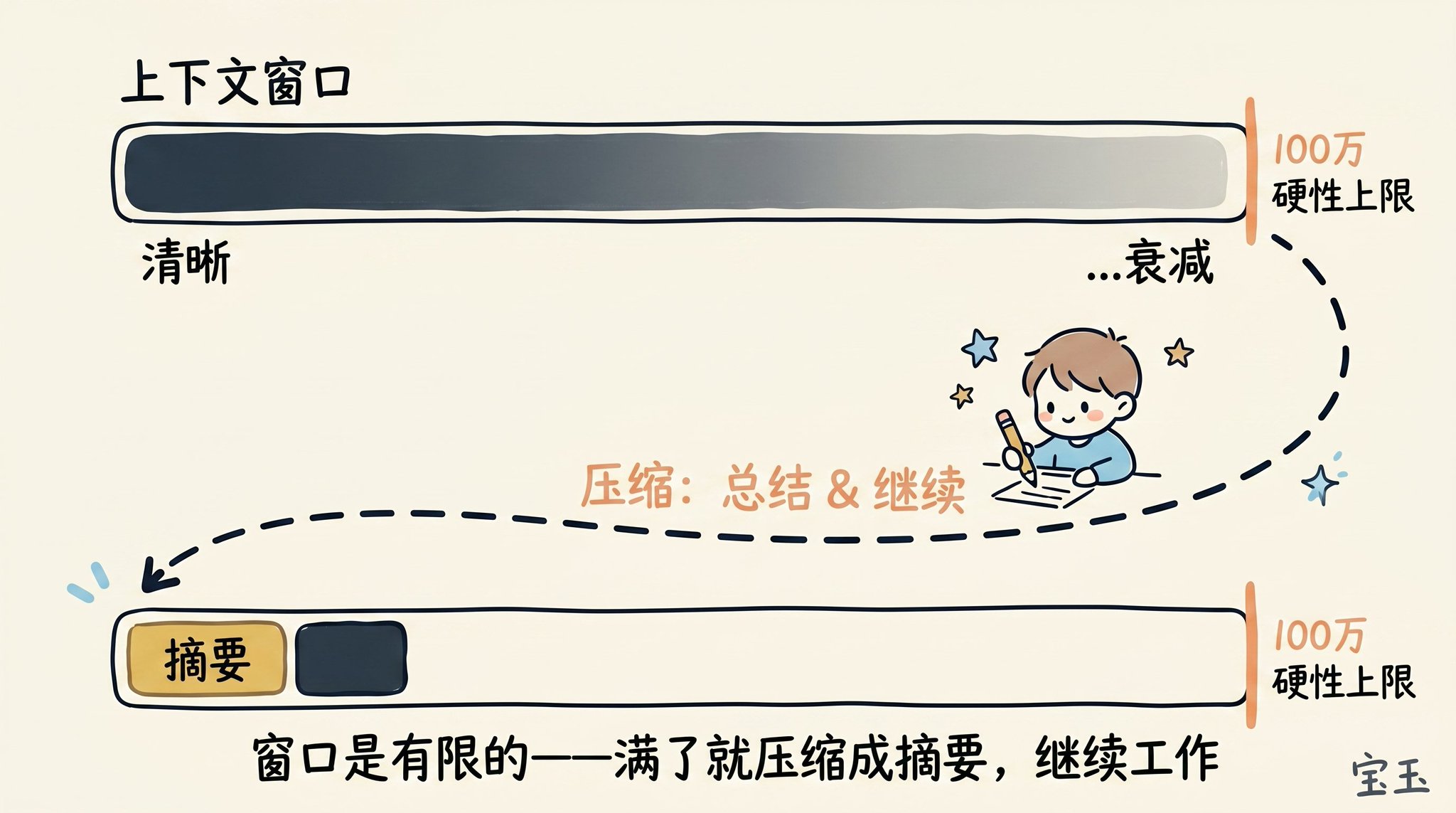
However, using the context comes with a cost, known as Context Rot (Note: Referring to the phenomenon where, as the dialogue history grows longer, the model has to process a large amount of information, causing its attention to become dispersed, leading to forgetting of earlier important information or distraction by irrelevant content). As the context grows longer, the model's performance often deteriorates because its attention is spread across more tokens. Early, no longer relevant content starts to interfere with the task the model is currently performing.
The Context Window has a hard capacity limit. So, as you are about to fill up the window, you must summarize the task you are working on into a brief description and then continue working in a new context window with that summary.
We call this process Compaction (Note: The process of condensing an excessively long history into a concise summary to free up memory space). Of course, you can also manually trigger this compaction process at any time.
Imagine you just had Claude help you with something, and it has completed the task. Now, your context is filled with information (such as tool calls, tool outputs, and your instructions).
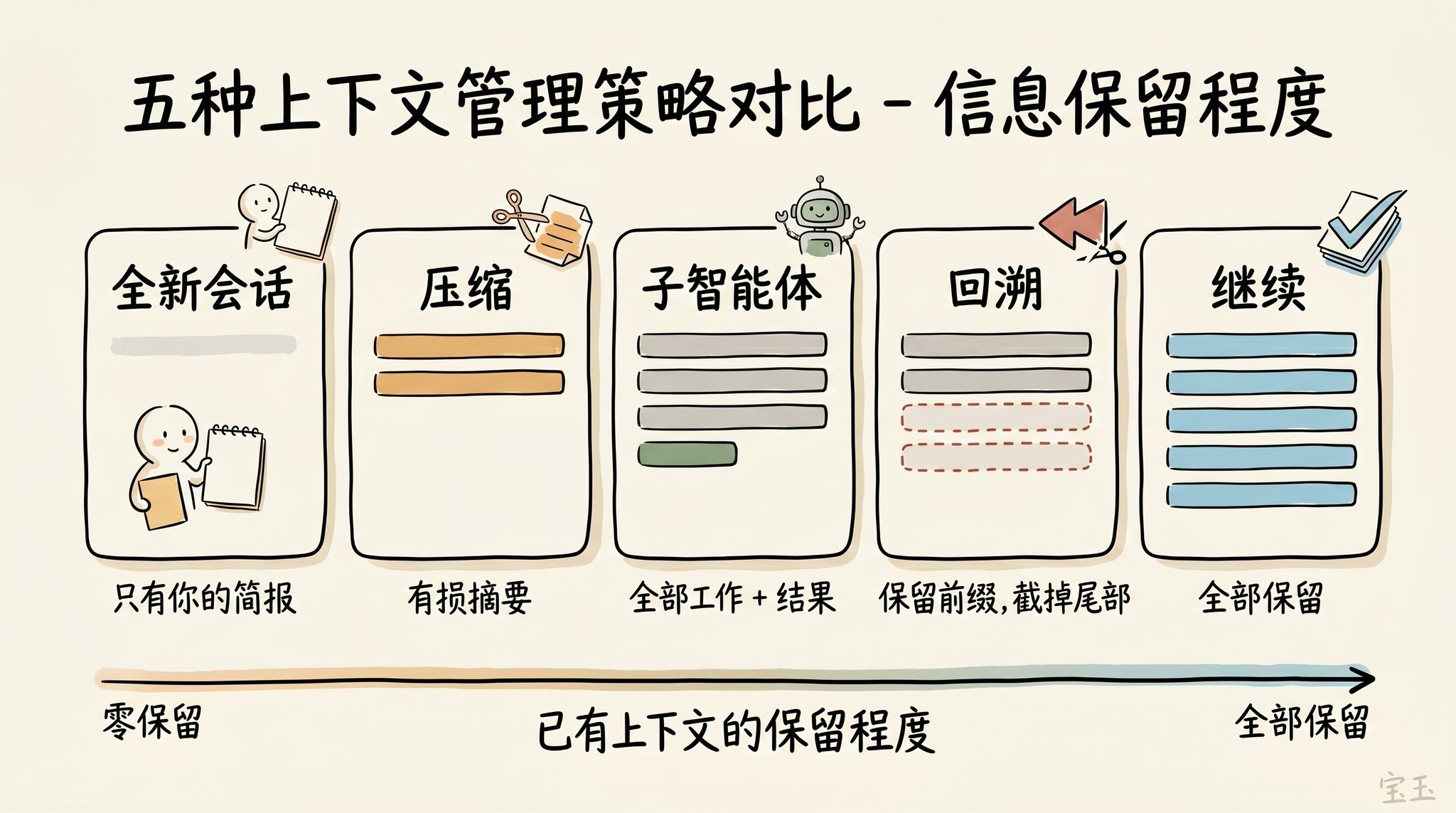
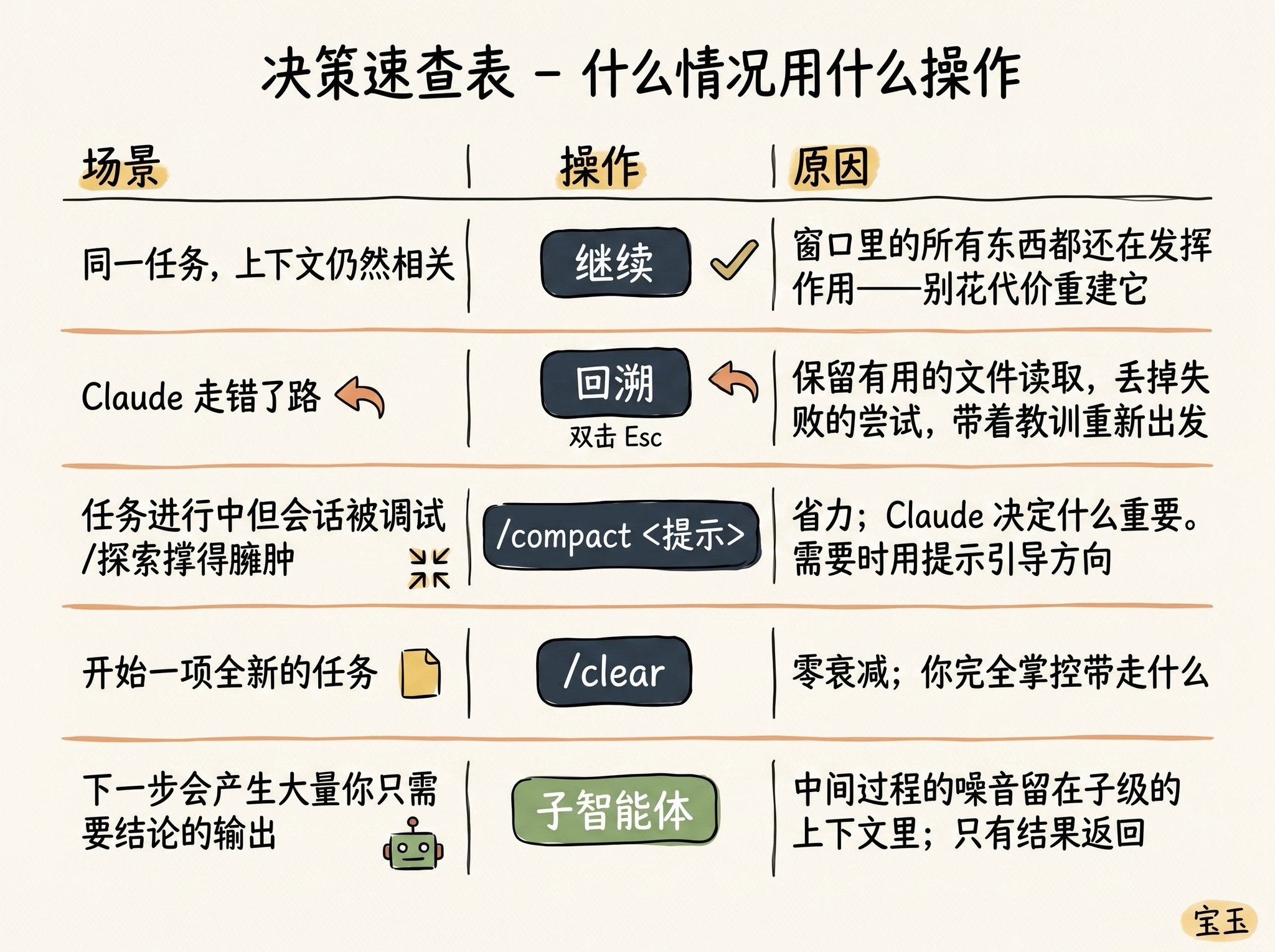
What should you do next? You might be surprised to find out that you actually have a lot of options:
· Continue—Send the next message directly in the same session
· Rewind (/rewind or press Esc key twice)—Rewind time to go back to the previous message and restart from there
· Clear—Start a new session, usually with a concise summary extracted from the recent conversation
· Compact—Summarize the current conversation and continue working based on that summary
· Subagents—Delegate the next stage of work to another AI agent with its own clean context and only pull back its final work result
While "Continue" directly may seem like the most straightforward response, the design of the other four options is to help you better manage your context.
When Should You Start a New Session?
When should you maintain a long-standing session, and when should you start fresh? Our rule of thumb is: when you start a new task, you should also start a new session.
A 1 million context window means you can now reliably complete longer, more complex tasks. For example, have Claude build a full-stack app from scratch for you.
However, sometimes you may be working on tasks that are related. In this case, you need to retain some of the previous context, but not all of it. For example, you just finished writing a new feature and now need to write user documentation for it. You could start a new session, but that means Claude has to reread all the code files you just wrote—slower and more costly.
Use "Rewind" Instead of "Correct"
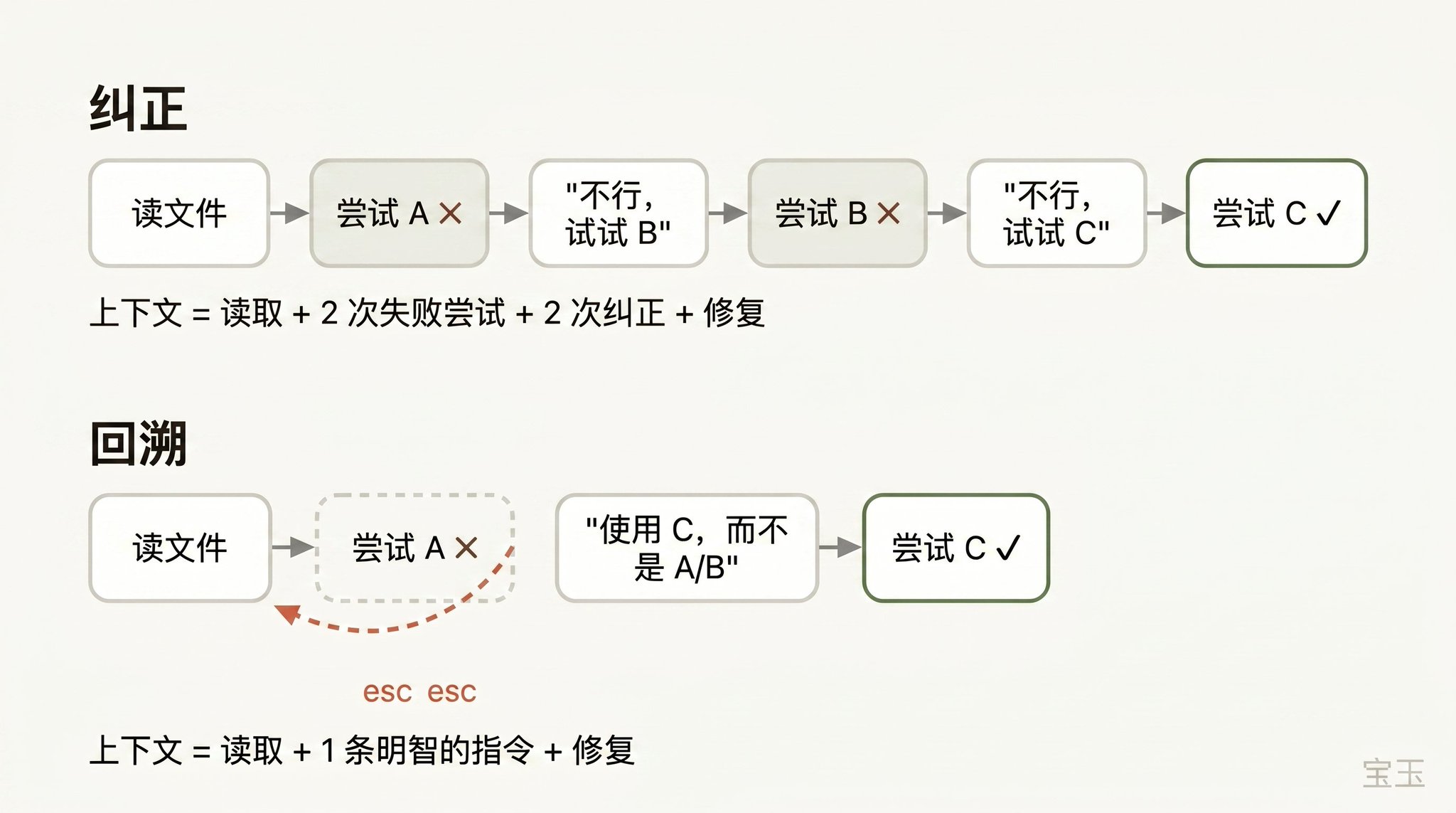
If I had to pick one habit that represents "excellent context management skills," it would definitely be using "Rewind" effectively.
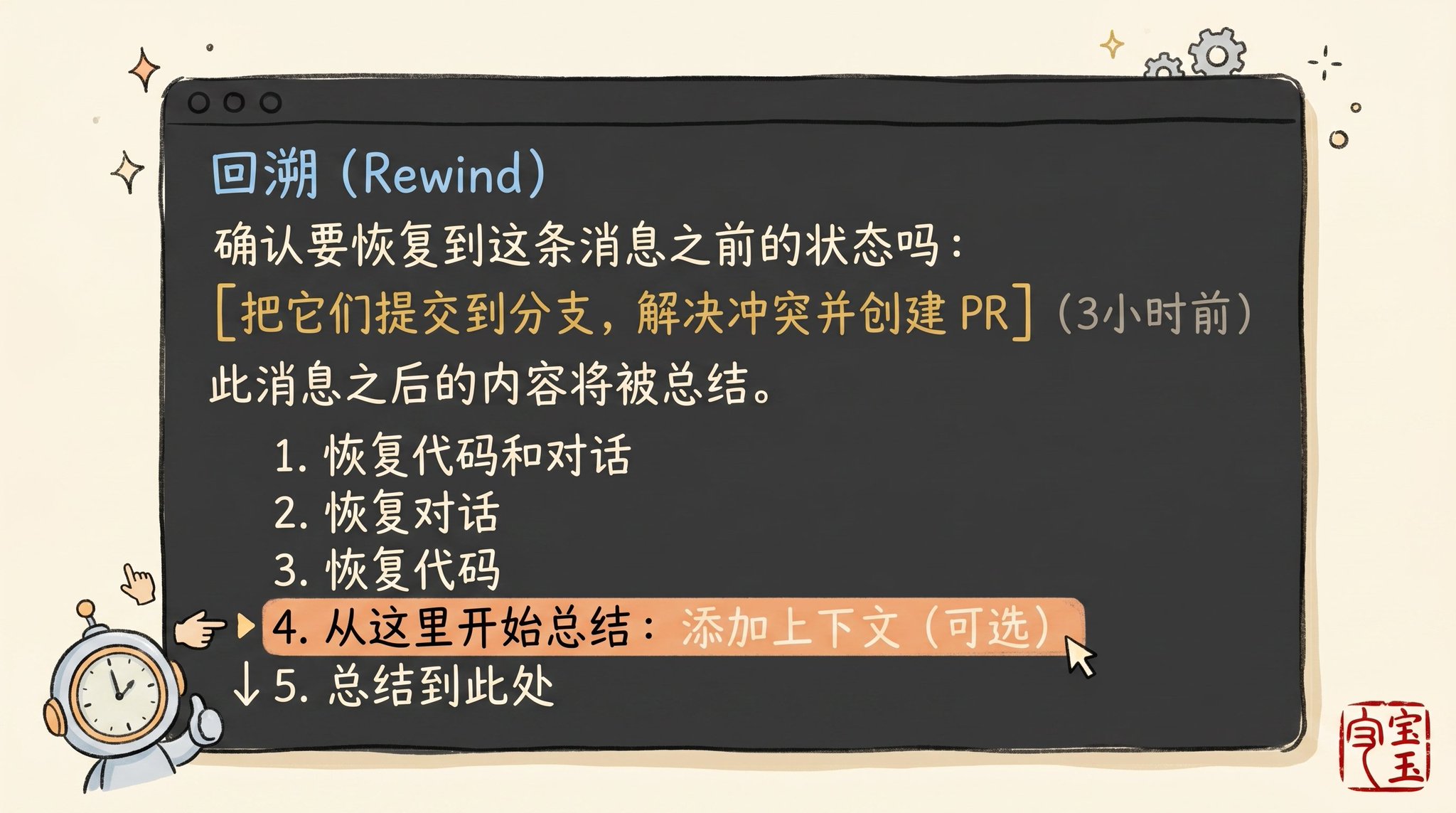
In Claude Code, double-tapping the Esc key (or running the /rewind command) allows you to go back to any previous message and then replay prompt words from there. All conversation that occurred after that point will be completely discarded from the context.
When correcting an AI's mistake, "backtracking" is often a more sophisticated approach. For example: Claude has read five files, tried a method, and it failed. Your instinctive response might be to type in the chat box, "This method doesn't work, try X method instead." But the smarter move is to backtrack to the moment right after it finished reading those five files, then with the lesson you just learned, rephrase it to say, "Don't use method A, the foo module doesn't support that at all—just go straight to trying method B."
You can even use the "summarize from here" feature to let Claude summarize the lesson it learned into a "handover message." It feels like the "future version of Claude" who just fell into a pit leaving a note for the past self who hasn't acted yet.
Context Compression vs Fresh Session
As a session becomes increasingly lengthy, you have two methods to "lighten the load": using /compact or /clear to start anew. While these two operations sound similar, their actual performance is quite different.
Compact involves the model summarizing the conversation up to that point and replacing the lengthy history with this summary. This process is "lossy," meaning you are giving Claude the power to decide "what content matters."
The benefit is you don't have to write anything, and Claude may be more considerate than you thought in retaining important lessons or file records. You can also control the direction of compression by issuing instructions (e.g., /compact focusing on the refactoring of the authentication module, discarding content related to testing and debugging).
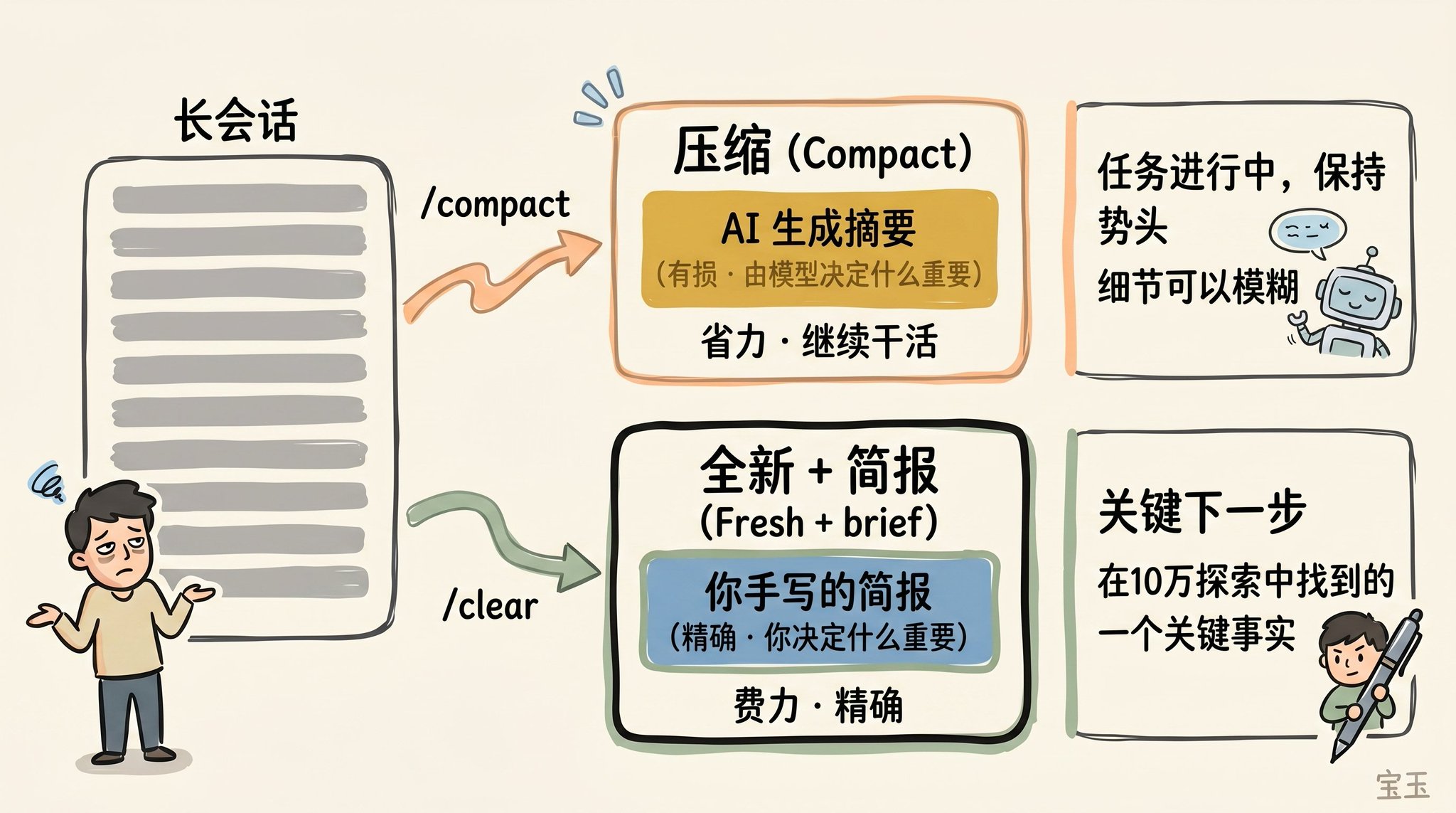
When using /clear, you need to write down the key points yourself (e.g., "We are refactoring the authentication middleware, the current constraint is X, the relevant important files are A and B, and we have ruled out method Y"), and then restart in an extremely clean state. Although this takes some effort, the new context that arises is 100% what you consider to be truly relevant.
What Kind of "Compression" Will Backfire?
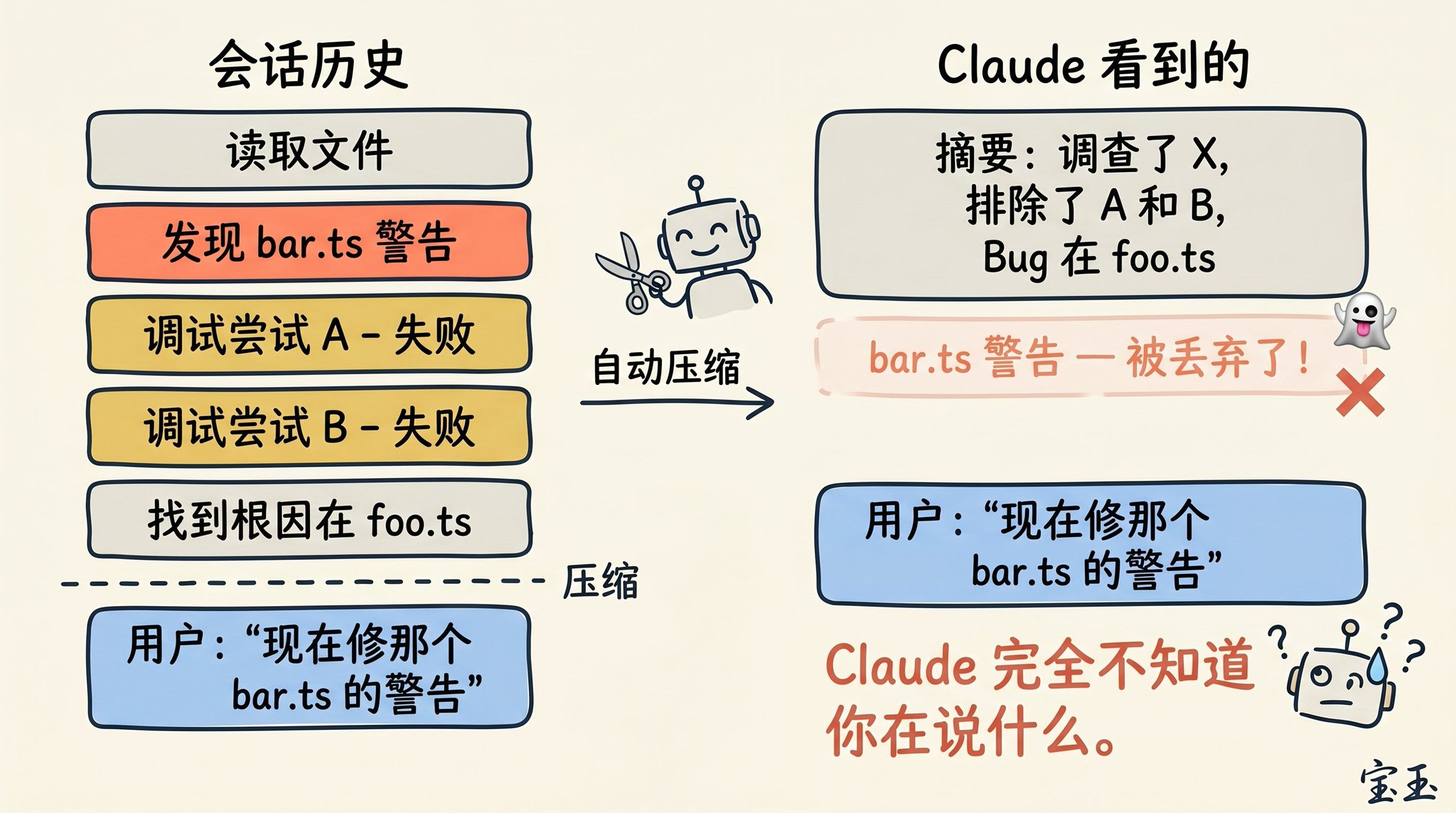
If you often hang on to a super long session, you have probably encountered a situation where the "compression" effect is extremely bad. We found that this "backfire" usually occurs at a specific moment: when the Large Language Model (LLM) cannot predict your next working direction.
For example, after a long debugging session, the system triggered automatic compression and summarized the previous troubleshooting process. Then, you immediately sent a message: "Now, let's also fix the other warning we saw in bar.ts before."
However, since the focus of the previous session was entirely on debugging the previous bug, the warning that wasn't fixed may have already been considered irrelevant information and was directly discarded during the summary.
This is a quite tricky issue. Due to context decay, the moment the model performs compression is often when its "intelligence" is least online. Fortunately, with a context capacity of 1 million, you now have more ample space to proactively include a description of "what I plan to do next," to execute /compact in advance.
Subagents and a Brand New Context Window
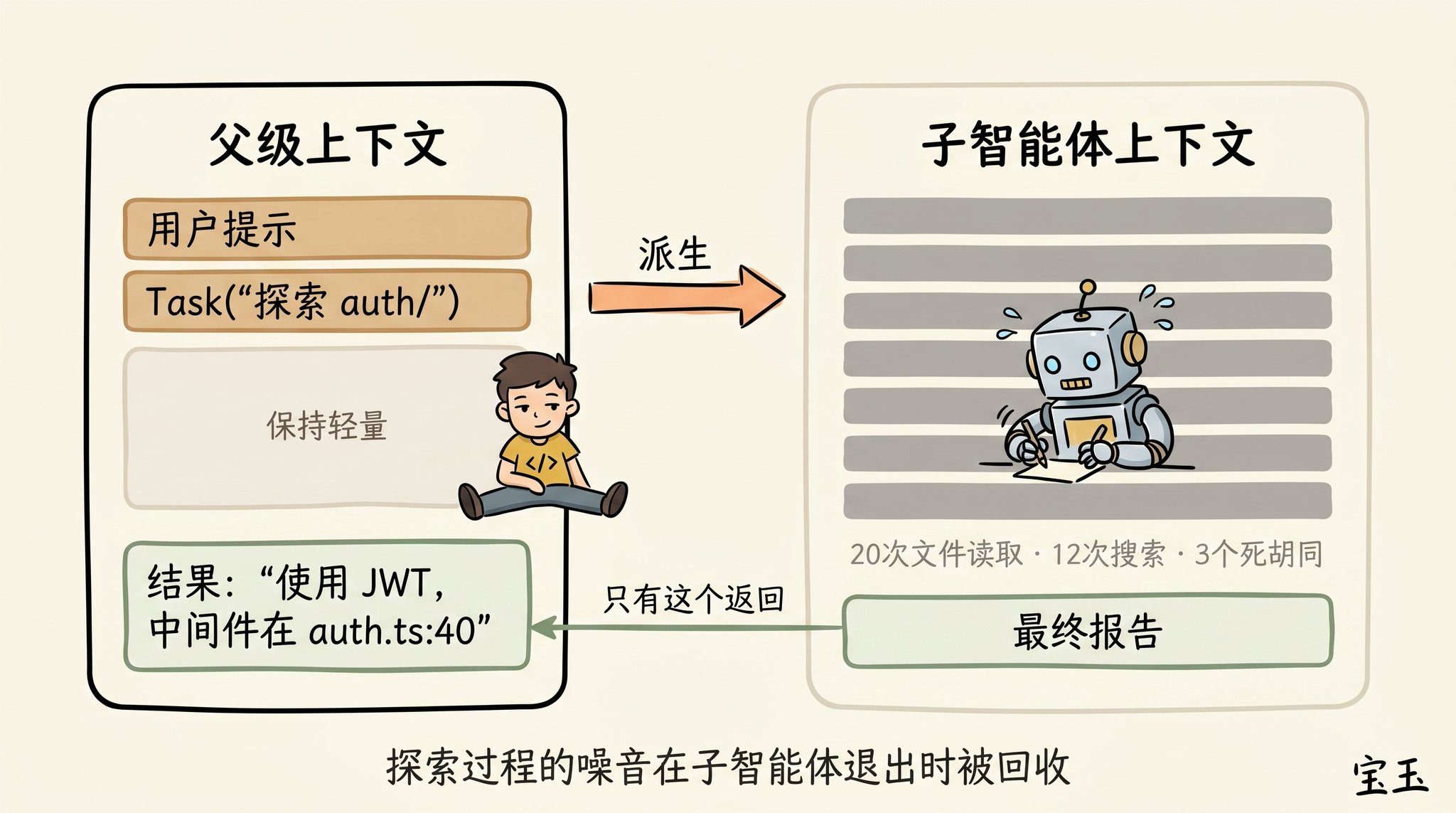
Subagents are also an excellent means of managing context. When you foresee in advance that a certain task will generate a lot of "read and forget" (never to be used again) intermediate results, this trick is especially useful.
When Claude spawns a subagent through the Agent tool, this little guy gets a completely fresh context window. It can mess around inside, do as much work as it likes. Once the job is done, it will distill the results and only hand over the final report to the "parent" Claude.
Our criterion for whether to use a subagent's "soul questioning" is: do I need to see the detailed output of these tools running in the future, or do I just want a final conclusion?
While Claude Code will automatically call subagents in the background, sometimes you can also command it very explicitly. For example, you can say:
· "Send a subagent to validate our recent work against the specification document below."
· "Send a subagent to read through another codebase, summarize how it implements the authentication process, and then mimic the process to implement it here."
· "Send a subagent to write documentation for this new feature based on my Git commit history."
In short, when Claude has completed a round of responses and you are about to send a new message, you stand at a crossroads of decision-making.
We hope that in the future, Claude will be smart enough to take care of all this by itself. But for now, mastering these decisions is the path you must take to guide Claude to produce high-quality results.
Welcome to join the official BlockBeats community:
Telegram Subscription Group: https://t.me/theblockbeats
Telegram Discussion Group: https://t.me/BlockBeats_App
Official Twitter Account: https://twitter.com/BlockBeatsAsia