How can you ensure that the platform and wallet APP you are using is secure?
原文标题:《 如何确保你正在用的平台和钱包 APP 是安全的? 》
Original author: Mu Mu, Vernacular blockchain
Asset security has always been an important topic in the crypto industry. However, according to the vernacular Blockchain Watch, although security science is often done, not many people really pay attention to security issues, because many people's general mentality is: "This is completely a probability event, it is not my" three melons and two dates ", but often think that the lottery is less likely to win their turn.
In fact, with the mainstream of crypto assets, there are frequent security incidents targeting individual users' assets, and whether large or small investors, in many cases, these incidents are happening around us, which is no longer a small probability.
So, starting from the most common security incidents of individual user assets, let's take a look at the security issues that are closely related to us. The first is: how to ensure that the platform and wallet APP you are using is secure?
01 Are "official channels" necessarily safe?
Most people think it's easy to secure platforms and wallet apps, just look to the "official channels". Not necessarily...
1. "Official Website" that looks more like official website than official website
Everyone knows to look for the "website", but can you immediately list the exact website address of a common mainstream wallet, for example? Do the test immediately:
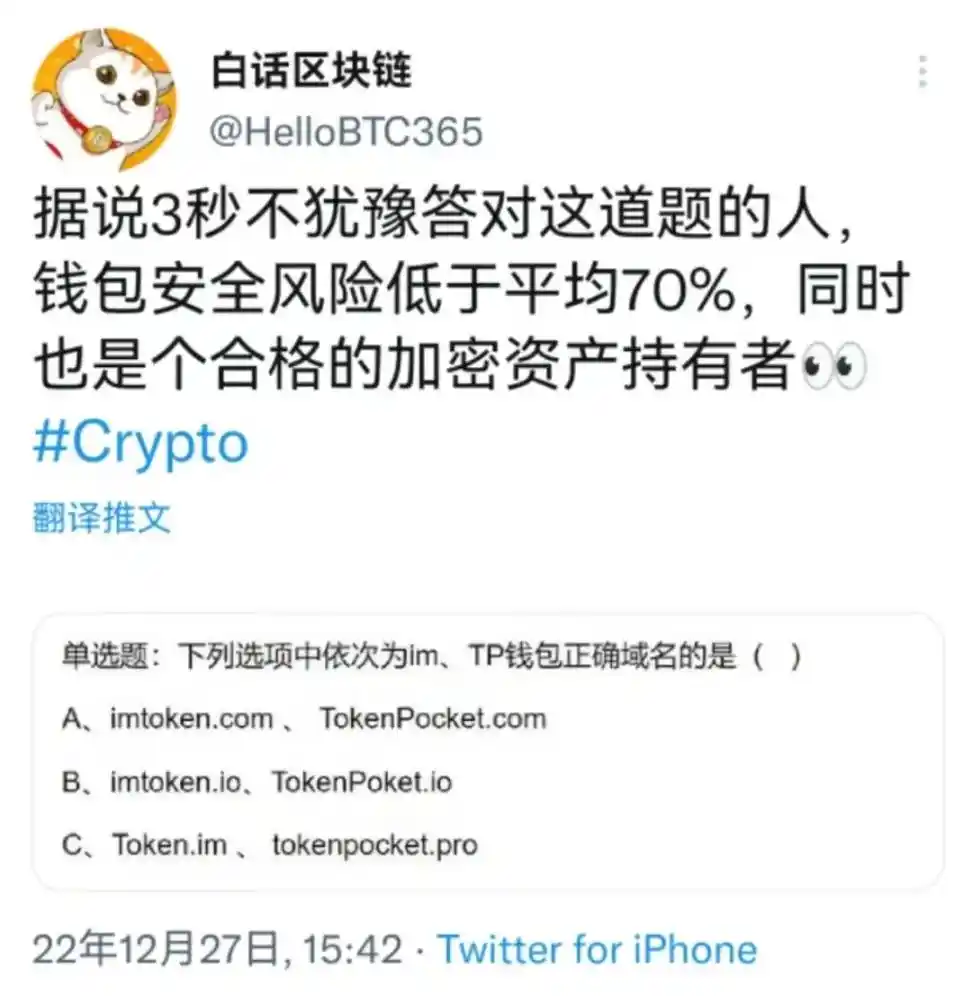
Most people may choose A and B, according to daily practice, many people will think that the brand name +.com or io suffix is the "brand strength" of the official website, but in fact many teams are early start-up small team started, when the registration of the official website domain name is very "sloppy", the correct answer is actually C.
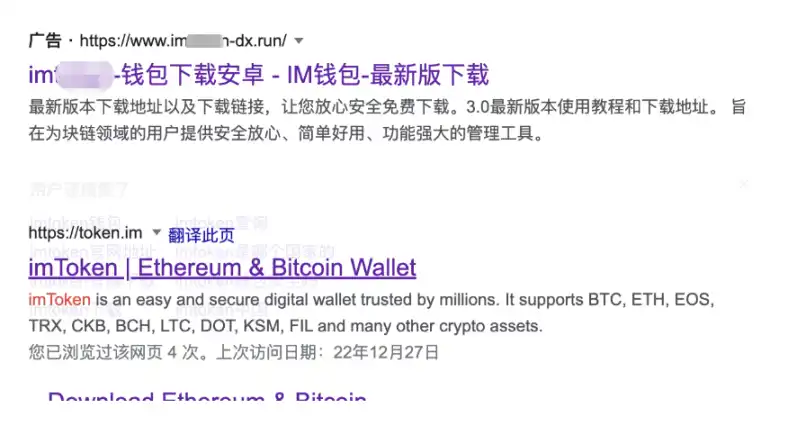
For the same reason, these wallet official teams may not even consider registering trademarks when they start out... And then the brand trademark is registered by others, and then others holding the trademark can buy brand protection services in some search engines, on the search results on the "brand official" certification label, or buy promotion services, always in front, this is very confusing, this thing happened in the first two years. So far in some mainstream search engine search "xxx wallet official website" the first few pages of results are likely to be fake.
These are "official website" than the official website, really "pit" a lot of people, because it is also one of the ways of low cost and high success rate for hackers.
2. What about the official website?
Many people think that if they enter the correct official domain name, the downloaded app must be secure. Still, things can go wrong. In the recent Bitkeep wallet security incident, BitKeep announced that after preliminary investigation by the team, it was suspected that part of the APK package download was hijacked by hackers, and packages with code implanted by hackers were installed.
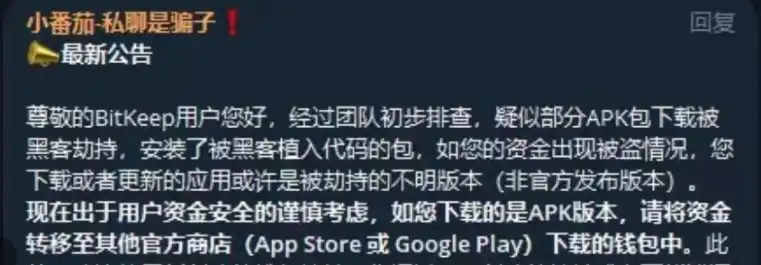
To put it simply, some users download the APK package in the process of hackers "hijacked", downloaded into the hacker special processing "wallet" for installation, we temporarily put it into an unofficial "fake wallet" ranks.
Notice mentioned the main reason is "hijacking", due to the "hijacking" methods and links, it is not clear what links out of the problem, but we can talk about how hackers usually let a user clearly input is the "official website" domain name, but download to the fake wallet:
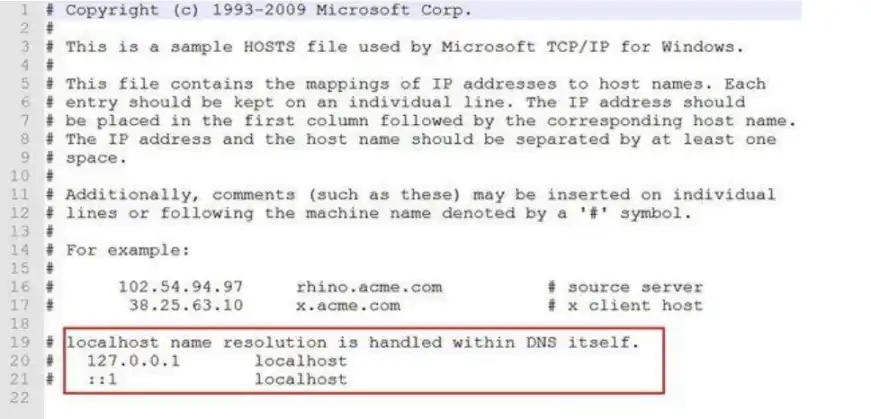
The first is the local Localhost file
After the local PC device is induced or installs malware or viruses through the vulnerability, the local host Localhost file can be modified. This method can direct the specified domain name to the IP address of the unofficial server (such as the "official" page prepared by the hacker), that is to say, after the browser is opened, enter the exact domain name, They visited websites provided by hackers and downloaded fake apps.
Second, directly in the local browser or App to open the page
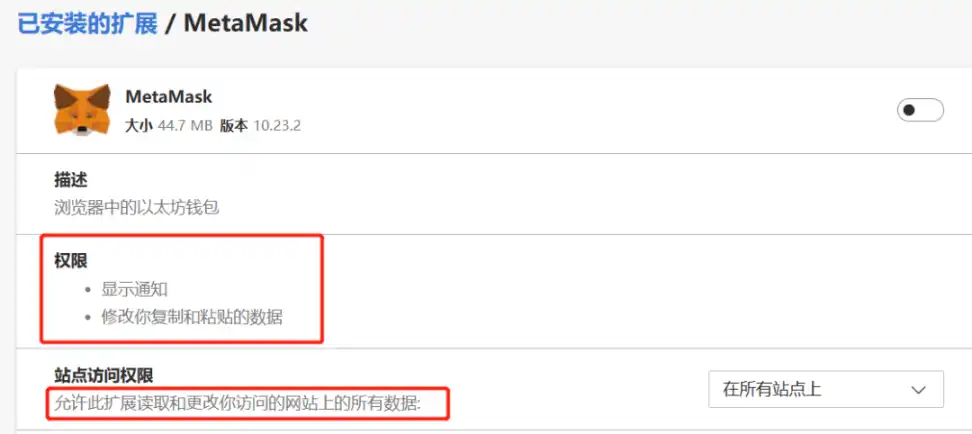
When you open some platform websites and wallet pages, you can directly modify the content displayed on specific pages through the browser plug-in. For example, you can replace the address of APP download link pointed by the APP download button with the address prepared by the hacker, replace the address of asset charge with that of the hacker, and read and modify the wallet address or private key in the clipboard. As for whether or not browser add-ons have permission to modify web pages, don't worry, because almost all browser add-ons have such permission, and if you look closely, you'll find that even our usual little Fox wallet has such permission... Not long ago, people who downloaded the header CEX found that even though we commonly used fake apps, the charged address was replaced, resulting in the loss of assets.
Third, remote DNS hijacking, domain name resolution record modification, APP vendor server is hacked
This belongs to the remote Internet service provider of the problem, rarely appear, the cost and difficulty coefficient is also very high, but does appear, is also through the similar "poisoning" way, let you access the domain name resolution to the hacker's address. In addition, the service provider's own domain name service provider account is stolen, resulting in the modification of domain name resolution may cause the input of the official website, but into the hacker website. In addition, if APP manufacturers themselves are hacked, there will be no words. These are situations that we cannot control.
02 Security tips for the Vernacular blockchain
In that hackers can even hijack the official website, have to sigh "impossible to defend", that how to be good? In fact, these security problems do not only exist in the field of encryption. In the digital era, there are security problems in any APP, including many fake "apps" in banks and third-party payment apps. Therefore, we sum up some corresponding security precautions based on past experience for your reference:
1. Use HTTPS to prevent hijacking
When entering the correct official domain name, you must add https:// to the beginning of the domain name. It is very useful. When opening the website, if there are risks of local hijacking or remote DNS hijacking, there will be a red warning of "unsafe" and other warnings of page security risks above the address bar of the browser. Simply put, this is one of the most widely used applications of asymmetric encryption, which is used to prevent hijacking by using asymmetric verification of encrypted signatures to ensure access to officially provided web pages.
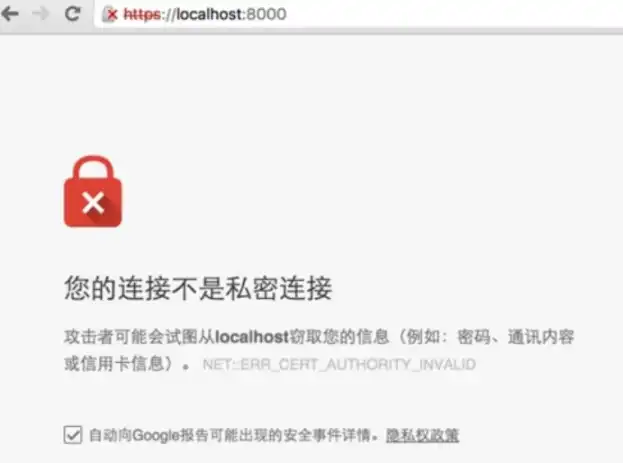
As an aside, the fact that many of the project's websites, even the DeFi website, do not use or force Https to deploy their websites is totally unreasonable, and it is hard to feel the dedication and professionalism of the team.
2. Check the hash of the APK file
Due to some special reasons, domestic Android mobile phone users cannot download apps directly through GooglePlay, but can only download the APK installation package, and most of the fake APP security incidents are caused by the replacement of the APK and the download of the fake APK, so we must ensure that the APK is officially provided.
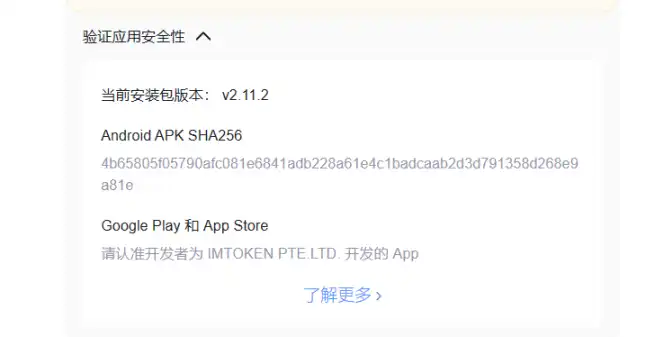
First open the official website with Https, enter the download page, careful students may see some download page usually will have a "verification application security" or SHA256 words link, it is expected that 80% of the people will not see the security tips, 90% of the people did not open the verification link to view the content and verification...
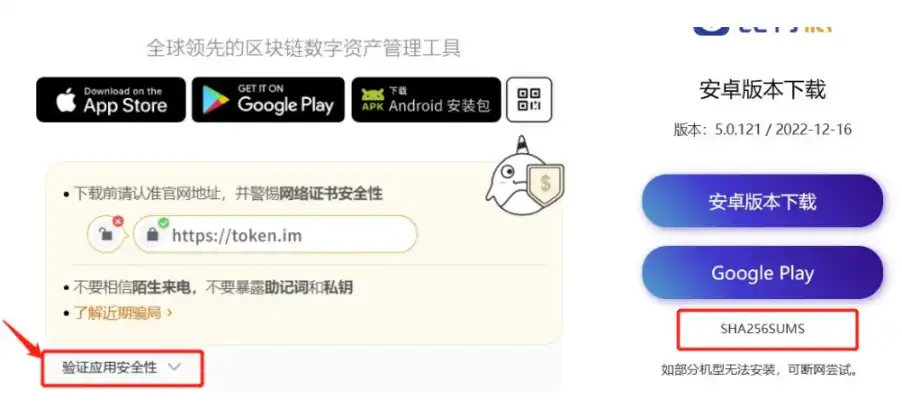
After clicking on the security verification link or the SHA256 link, we will see the official hash value of the APK installation package file (the hash value will change completely if the file has been modified in any way). After downloading the APK file, we can calculate that its hash value is the same as the official hash value to show that the file has not been replaced.
After downloading APK, the key step is to open Google's virustotal.com virus search website, upload just downloaded APK file, we can get the file hash value for comparison and at the same time through dozens of virus libraries and search whether the file carries malicious code, etc. It kills two birds with one stone.
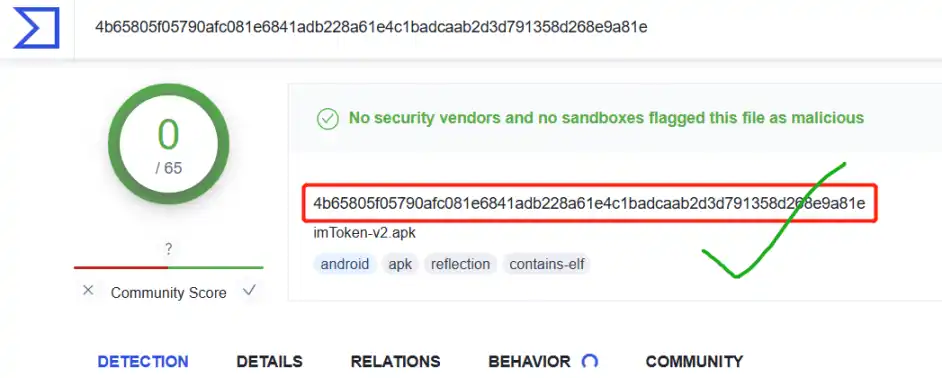
Finally, if you want to be more rigorous, you should also pay attention to the concern that the hash value and download link will be tampered with by local viruses and plug-ins at the same time when you open the official website download page. Then you can check whether the hash value is consistent through browsers in different environments such as mobile phones.
If the download page of the official website of the wallet you plan to download does not support Https, you should first doubt whether it is the real official website. In addition, if you do not provide the check of the hash value of the APK file, you can also doubt the rigorous attitude of the wallet team to security, such a omission is very wrong and irresponsible. Please consider carefully whether to use this APP.
3. How to check whether the currently installed platform and wallet APP is secure?
In fact, the best way is to download and install the Android Google Play and IOS AppStore through the download page of the official website. In theory, the security factor of Google and Apple app stores is much higher than the official security factor of wallet. Their platforms have the world's top security hardware and software and talent pool. Wallets or platforms are not of the same order of magnitude.
Therefore, open GooglePlay and AppStore pages through the wallet and the official website download page of the platform, and confirm once again that there is no problem with the developer's company name, downloads, and comments (mainstream wallets have a large amount). At this time, we can consider the downloaded APP to be safe.
If the current device is using the apk package installation application is not sure whether it is safe, you can follow the method of the previous two security tips, determine the official and verify the hash, then download to the mobile phone to cover the installation, but do not forget to backup the mnemonic words first, The wallet cannot be recovered in case of lost data due to an error in the overwriting process (although generally overwriting an installation or updating application will not cause data loss).
4. Other tips on wallet security
If you do not need cold wallet, hardware wallet, like hot wallet friends, the most secure is the installation of iphone device, one only needs an overseas ID does not need Android such a variety of fiddling, second, iPhone locked encrypted data can not be unlocked without a key.
Many mainstream overseas apps (such as Metamask) do not support the separate download and installation of APK, because of too many security problems, but many manufacturers in order to pull new forced, Android users are too large and other reasons to open APK download, Android if you want to bypass the problem of APK, Required software such as Google Services Framework (including Google Play) and Google Password Validator is currently very difficult to install for some reason, and many people turn to third-party solutions from unofficial sources that themselves may not be secure or rigorous enough.
Definitely use an Android phone, such as Samsung, which currently supports the Google Family Bucket framework natively, and a device that installs the wallet into a secure folder that supports the security chip isolation can be a second layer of security, providing the same added security effect as an iPhone that can't be unlocked to access sensitive data if lost.
5. Suggestions on platform APP
Since most CEX platforms adopt multiple verification, they are not affected by fake apps (which is difficult for hackers). However, we should also pay attention to confirm whether the charged address in the APP is consistent with that provided on the official website page. In addition, we must enable the "whitelist" function in the platform, so that assets can only be mentioned to the secure whitelist address.
In addition, in addition to the two local hijacking and modification addresses mentioned above, the biggest risk platform CEX faces is phishing, because most people's APP, SMS and Google authenticator are actually installed on the same device, which makes it possible for hackers to control or monitor a device. You can control these three pieces of information with high probability to control your platform assets.
Therefore, for security reasons, it is not very recommended to operate multiple verification on one device at the same time. You can install Google validator on another secure mobile phone, or you can not install app on the mobile phone but operate the platform account on the PC or PC web terminal, which can prevent single point "explosion" and maximize the protection of asset security.
03 summary
Security is no small matter. Vernacular blockchain believes that security issues are worth talking about every day, all the time. In the daily operation process, perhaps only one second more time to pay attention to these details can improve the possibility of 99% security for assets, why not?
Original link
Welcome to join the official BlockBeats community:
Telegram Subscription Group: https://t.me/theblockbeats
Telegram Discussion Group: https://t.me/BlockBeats_App
Official Twitter Account: https://twitter.com/BlockBeatsAsia
 Related Articles