Teach you how to use multi-signature wallet Gnosis Safe
Original author: Gnosis Safe team
Original compilation: Bob, BlockBeats
This article is based on Gnosis Safe official documents, BlockBeats translates it as follows:
In the past 4 years, the development of the multi-signature wallet Gnosis Safe has reached a new level the height of. It has become the key infrastructure of Web3, protecting digital assets for DAOs, institutions, projects and individuals. On the Ethereum mainnet alone, Gnosis Safe users manage over $64 billion in assets, all of which are self Keep it!
What is multi-signature?
Gnosis Safe Basics
Most Ethereum Users are used to using single-key wallets (eg: MetaMask), often called External Accounts (EOA). These accounts are secured with private keys that can be converted into a user's 12-word "memory phrase." If this private key is compromised in any way, funds could be stolen.
If your business is comprised of more than 1 person, external accounts are not a secure way to manage crypto business funds. If the employees are unethical or not careful with the private keys, the funds will be lost forever. Even if your business consists only of yourself, I think it's still poor money management. So, what's a better solution?
Use multi-signature. Gnosis Safe is a smart contract wallet running on Ethereum that requires a minimum number of people to approve a transaction before it can happen (M-of-N). For example, if you have 3 key stakeholders in your business, you can set up your wallet to require approval from all 3 before sending a transaction. This ensures that no one can steal funds.
Most importantly, Gnosis Safe gives you complete self-regulation of your funds. Banks don't give you the hassle to run your crypto business, and the smart contracts deployed are completely trustless and under your control.
Comparing Gnosis Safe with other digital asset storage solutions

Why do I need to connect the signer wallet?
For To create a Gnosis Safe account, you need to connect a signer wallet as a first step. The Gnosis Safe account address will be different from the address of your signer wallet.
Gnosis Safe is made up of multiple owners
Gnosis Safe is a multi-signature account controlled by its signer key. Please see the corresponding help center article to learn about this for more information.
Signer wallet to sign and execute transactions
Gnosis Safe The web interface does not contain a private key. Therefore, it cannot sign or execute transactions. Therefore, a signer wallet is required to store the signer key, which is used to (1) create Gnosis Safe accounts, (2) sign transactions (on-chain or off-chain), and finally (3) execute transactions.
What wallet should I use and what if I don't have one yet?
This is really a personal decision. Gnosis Safe supports a variety of signer wallets. The most popular options are Metamask and hardware wallets like Trezor and Ledger. We recommend that you do your own research on the different options to determine which one is right for you.

Create a Safe account
Creating and setting up a Gnosis Safe account takes 60 seconds . Here's a walkthrough for getting started:
First, start at https://gnosis-safe.io/app/"> Open the web app at safe.io/app/.
Connect Signer Wallet
In order to start creating Gnosis Safe account, you first have to connect a signer wallet (The reasons are as follows). We support a variety of signer wallets that can be selected to interact with Gnosis Safe. Make sure you have some ETH on your wallet, as a Safe deployment will Spend some transaction fees.

Choose a name
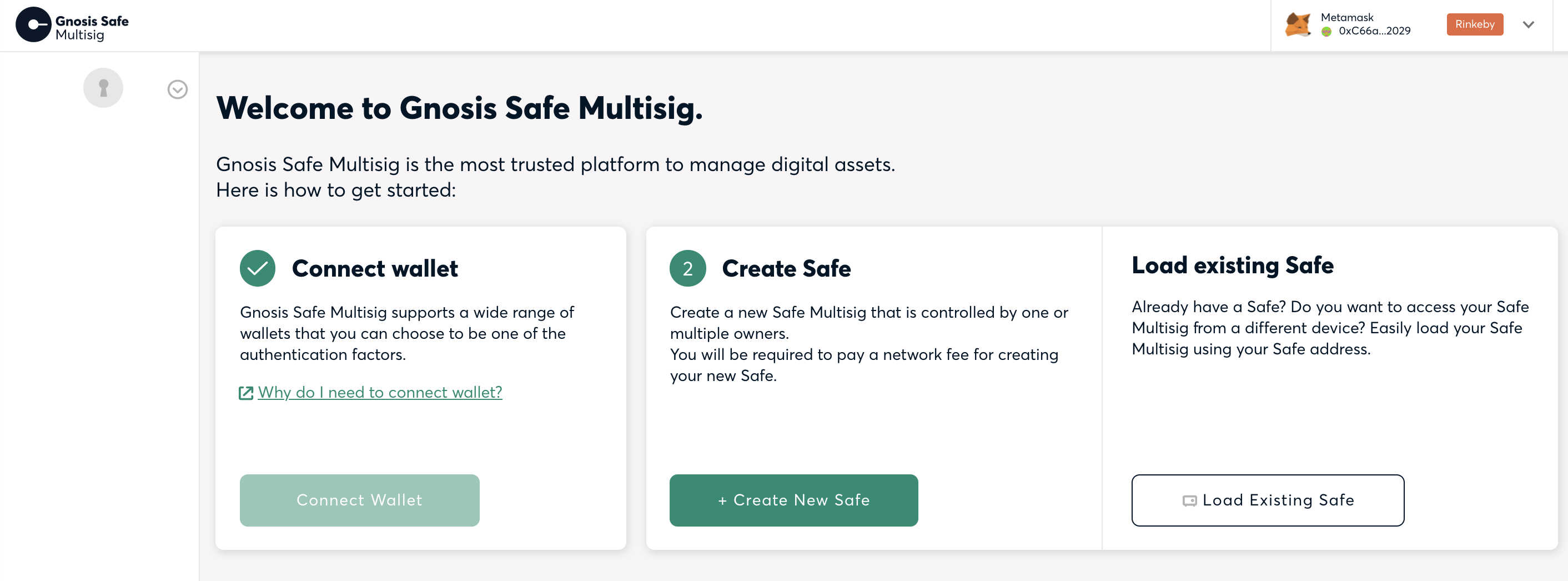
Once you have selected your wallet, you can start the process of setting up Safe by clicking "Create a new Safe Account" . First, you need to give your new Safe account a name. This name is only stored on your computer and is never shared with Gnosis or any third party.
Choose the signer
This step is very important because These are the addresses that have authority to submit and approve transactions (you can still delete or replace these addresses later). Your connected signer wallet has been added as the first signer as suggested, but you can change it too. Add as many signers as you want by pasting an Ethereum address or typing in an ENS name.

See this article for some information on which Gnosis Safe setup to use, i.e. which owners wallet, how many owner wallets and what threshold.
Defining Confirmation Thresholds
The last step is to select your How many signer confirmations are required before a transaction or any settings change on a Gnosis Safe account is approved. Be sure to carefully consider your setup. If you cannot get enough signers to meet the threshold requirement, you will not be able to recover your assets.
View and deploy Safe
After viewing all parameters , you can submit the creation of your Gnosis Safe account and follow the on-screen instructions to complete account creation.
What Safe setting should I use?
When setting up Gnosis Safe, there are usually 3 decisions to make:
1. How many owners are there?
2. What threshold?
3. Which owner wallet to use?
There is no single best answer to these 3 questions, nor is there a single Gnosis Safe setting that is best. It really depends on the specific use case.
Nonetheless, this article attempts to offer some advice on things to consider:
How many owners are there?
It is generally recommended to use multiple owner accounts. Anyway, when managing funds as a group, this is a no-brainer since there should be more than 1 person with access. However, even when managing funds as an individual, it is recommended to have more than 1 owner account in order to have more than 1 authentication factor.
What threshold?
Safe's threshold specifies how many owner account counts are required to confirm a Safe transaction before it can be executed.
It is recommended to use a threshold higher than 1 so that no single account can execute a transaction, but always requires at least one account to verify and execute Safe transactions. Therefore, even if the attacker holds 1 account, they cannot transfer funds.
Also, better to use a threshold lower than the total number of Safe owners. So even if one owner loses access to their account, users won't automatically lock all their funds in Safe, but other owners can still perform transactions, such as replacing a lost owner account. You can think of this as some kind of recovery mechanism.
Which owner wallet to use?
It depends on which owner wallet you may already be using. Safe is compatible with hardware wallets like Metamask, Ledger, or Trezor, as well as mobile wallets that support WalletConnect like Trust, Argent, or Rainbow wallets.
You can also use the Gnosis Safe mobile app as one of your owners to Sign the transaction (https://gnosis-safe.io/#mobile). With this mobile app, we are trying to provide the best and safe user experience when confirming transactions.
What are common Gnosis Safe settings?
Due to its popularity, many Gnosis Safes are used with at least one Metamask owner. Metamask is followed by hardware wallets such as Ledger and Trezor. The Gnosis Safe mobile app is also gaining popularity as an owner wallet option.
A common setup for individuals is to have 3 owners (1 Metamask, 2 hardware wallets ) and a Safe setting of threshold 2. Metamask + one of the hardware wallets is used daily to sign and execute transactions. The second hardware wallet is locked in a safe place in case one of the other 2 owners gets lost.
A common setup for groups co-managing funds is for each person to use 1 owner account and then Use a threshold of 3. So no one person can execute the transaction, all transactions are double checked by 2 other people. On the other hand, not all owners need to confirm every transaction all the time, which can be an advantage for time-critical transactions.
If different transactions or assets require different numbers of owners to confirm, we have seen many organizations use different Safes with different assets and different owners and threshold settings.
For information on how to create a Safe, see this article.
Supported Asset Types
Gnosis Safe can usually manage The same assets you manage with wallets like Metamask or Ledger. However, depending on the type of asset, there may be some limitations. The following section provides more details on this:
Ethereum and ERC20 Token
< br>
Gnosis Safe supports Ethereum and all assets that are fully compliant with the ERC20 standard. This includes assets like DAI, USDC, UNI, etc. These assets can be accessed via the Gnosis Safe Web Interface and Gnosis Safe Mobile application for local management.

ERC721 Token (NFT/Collection)
Gnosis Safe supports full compliance with the ERC721 standard< NFTs/collectibles for /a>. They are available through the Collectibles tab on the Gnosis Safe Web Interface as well as the Gnosis Safe Mobile app for local management.
For more details see separate article about NFTs.
Other assets
Generally, other tokens and assets should be supported type, but should be carefully checked before use. And a distinction must be made between assets supported at the account level and those displayed correctly in the Gnosis Safe interface.
Interface level support
In the Gnosis Safe interface, there is no easy way to manage assets other than those mentioned above. For NFTs that are not ERC721 compliant, you need Connect to third-party interfaces via WalletConnect, such as OpenSea.
Interface support can also be added through the Safe app. For more information on Safe Apps, please visit our blog and Developer Portal.
Account Level Support
However, at the account level, Gnosis Safe supports many more asset types than mentioned above. Certain token standards require receivers to implement callback functions. In Gnosis Safe this is done through the so called fallback manager, which supports ERC721 and ERC1155 callbacks by default. More can be added manually if needed.
Remittance
To initiate a new asset transfer, please Click the New Transaction button in the side menu and select Send Funds.

In the next step you will be able to choose the recipient. By selecting an address from the address book or pasting a new address in the input field.

Continue to select the assets you want to transfer to the recipient and the The amount sent.

Finally, you can view the transfer details, and Modify advanced transaction parameters (gas limit, etc.)

After clicking submit , you must use your signer wallet to sign transactions. And depending on the threshold policy used, the transaction is either executed immediately or requires additional signatures from other signers of the Gnosis Safe account.
Contract Interaction
This is a question about how to use " An example of interacting with an arbitrary smart contract using the "Contract Interaction" function. You can use the send button to access contract interaction functions.

1) Select the smart contract to interact with
p>
First, you need to paste the valid Ethereum address of the smart contract you want to interact with.

2) Specify ABI
< br>
For contracts verified on Etherscan, we automatically suggest an ABI, but you can also add an ABI manually using the input field.
3) Select Method
You can now select one of the available methods for this contract . Gnosis Safe supports both read and write functionality.

4) Define parameters
The interface will now display the parameters and parameter types of the method. Optional: In the Value input field define the amount of ETH to send through this contract interaction.
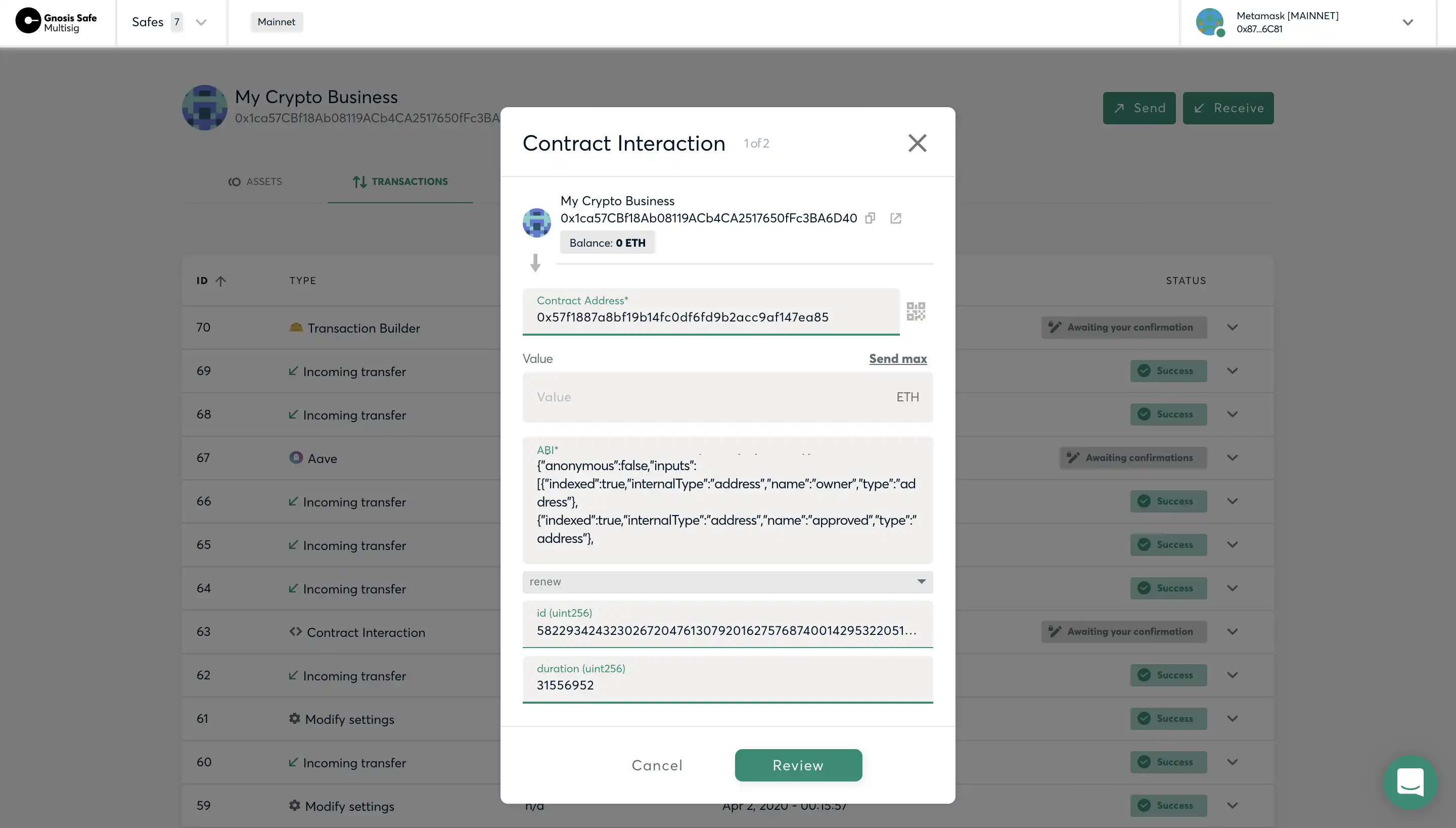
5) Review and send
Finally, you can view Your smart contract interacts and confirms the transaction. Depending on your owner settings, the transaction must also be confirmed by other signers.

Original link
Welcome to join the official BlockBeats community:
Telegram Subscription Group: https://t.me/theblockbeats
Telegram Discussion Group: https://t.me/BlockBeats_App
Official Twitter Account: https://twitter.com/BlockBeatsAsia
 Related Articles