How to Claim SomniLife Airdrop
Original title: " Connect your Twitter & Wallet to SomniLife and Earn Free $SO "
Original author: SomniLife
To celebrate the launch of SomniLife, SomniLife will airdrop SO Token to blockchain fans and Twitter users. Just connect your wallet address and Twitter on the SomniLife official website to get SO airdrops.
SomniLife is a Web3-based SocialFi Network and Modular 3D Metaverse where users can explore, live , socialize and grow your wealth.
SomnilLife also provides a Web3 solution for all Web2 social networks, enriching new experiences that increase the advantages of traditional social media.
SO is the digital currency of the SomniLife ecosystem and can be used to purchase items in SomniLife, pay for premium services, and more. Users can also earn SO rewards for creating and socializing within SomniLife.

Get SO Token rewards now in 3 simple steps
Users can experience the benefits of connecting Web2 social media to SomniLife's Web3 platform. To get SO Token, you only need to do the following: connect wallet, connect Twitter account, confirm the SO rewards you can get, and receive SO rewards.
Bonus: Create Referrals Link and get 50% of the SO Tokens your referred friends get.
Connect wallet to Somnilife.com
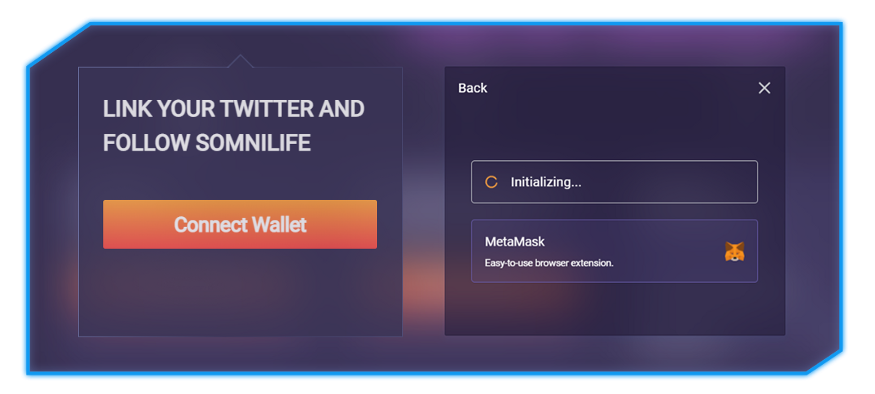
1. Go to https://www.somnilife.com/web3airdrop and select "Connect Wallet".
2. Choose your preferred digital wallet connection method (Metamask or WalletConnect).
3. Select "Next" in the pop-up window, and then select "Connect" in the pop-up window below.

Connect Twitter account to SomniLife
< br>
1. After connecting the wallet, click the "connect twitter" button.
2. Enter the Twitter login information and confirm.
3. After confirming the Twitter connection, your Twitter avatar and related profile information will appear.

Check activity score and confirm your SO reward
< p>1. After connecting the wallet and Twitter, SomniLife will calculate your Chain Activity Score and Twitter Activity Score, and further calculate how many SO rewards you can get.
2. Chain Activity Score is based on the gas fee you consume in Ethereum, Polygon and BSC in 2021.
3. Twitter Activity Score is based on your DeFi-related tweets, likes and followers on your Twitter.
4. The activity score will only be calculated once and will not be updated in real time.

5. You can view the obtained SO rewards in SomniLife profile.

6. Claim your award as SO and keep it for For future projects, transactions, etc. Initially, reward claiming is currently only supported on the Ethereum network.
Additional bonus: Create a referral link and get 50% of the SO Tokens earned by the friends you refer.

Invite your friends to participate and get 50% of their SO rewards As an added bonus. If your friend receives $100, you will get an extra $50.
For more information on SO, check out this article:
https://somnilife.medium.com/about-so-the-native-token-of-somnilife- ecosystem-439745096a85
Some details about the event:
This airdrop can issue up to 0.2% of the maximum total supply of SO.
The airdrop will last for 14 days, starting from January 7th. Event length will also be shortened if SO airdrops are issued that reach the maximum supply limit earlier.
A user's activity score is calculated once and will not be updated in real time.
SomniLife reserves the right to modify the offer or conditions at any time.
The trading of SO Token has not started yet, please stay tuned for our Q1 2022 announcement.
This article is from an official contribution and does not represent the opinion of Rhythm BlockBeats
Original link
Welcome to join the official BlockBeats community:
Telegram Subscription Group: https://t.me/theblockbeats
Telegram Discussion Group: https://t.me/BlockBeats_App
Official Twitter Account: https://twitter.com/BlockBeatsAsia
 Related Articles