
How is a WeChat Account Stolen and How to Prevent It?
How Was WeChat Account Hacked? (This Article is Mainly AI-generated)
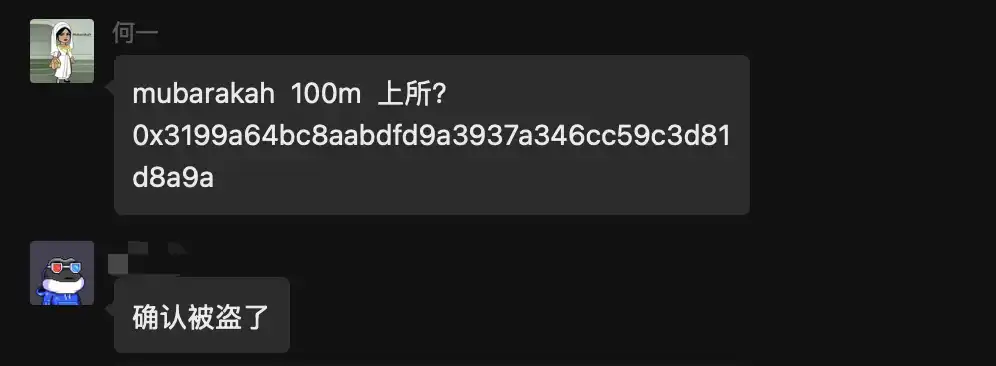
Today, Binance co-founder He Yi's WeChat account was hacked, and the hacker posted fake news in his Moments and various communities.
Many users, especially those in the cryptocurrency circle who frequently travel between China and abroad, often have the habit of changing their phone numbers. The culprit behind the recent series of hacked accounts is the overlooked practice by many users—the phone number reassignment by telecom operators.
What is "Phone Number Reassignment"?
When a user stops paying for a particular phone number or voluntarily cancels the number, the telecom operator, in order to utilize resources, will, after a "cooling-off period" (usually 3-6 months), reassign the number to the market and sell it to a new user.
How do hackers exploit this?
This creates a critical time gap and a logical loophole:
· Forgotten Bindings: Although the original owner has abandoned the phone number, they often forget to unbind the WeChat account associated with that number.
· New Owner's Privilege: After obtaining this "old number," the hacker (or the new user who unintentionally purchased the number) only needs to select "Log in via Mobile Number" or "Forgot Password" on the WeChat login page.
· SMS Verification Code Breakthrough: The WeChat system recognizes that the phone number is already registered and immediately sends a verification code. The hacker with the new SIM card enters the code and easily resets the password.
· Full Access: Once successfully logged in, the hacker gains full control of the account, including Moments, group chats, and contacts.
For cryptocurrency enthusiasts, this risk is significantly heightened due to their frequent use of backup phones, foreign SIM cards, or suspension of domestic numbers due to overseas travels.
In addition to phone number reassignment, the following two scenarios are also common causes of WeChat account hacks:
· Phishing Links and Trojans: Hackers disguise themselves as project teams or exchange customer service representatives, sending links or files (such as .exe disguised as .pdf) containing trojans. Once clicked on WeChat on a computer, the trojan immediately steals login credentials.
· Zombie Followers Cleanup Tools: Many people, in order to clean up their friends list, casually authorize insecure third-party "follower cleanup software" to scan the QR code, essentially handing over control of their account to strangers.
How to Prevent WeChat Account Hacking?
Now that you understand the principles, prevention is actually not difficult. Please immediately check your WeChat settings against the following checklist:
1. Core Rule: If you change your number, you must rebind
This is the most important point. If you no longer use your phone number (whether it is deactivated or not renewed), be sure to rebind your WeChat account before deactivating your number.
· Operation Path: WeChat > Me > Settings > Account Security > Phone Number > Change Phone Number.
· Note: It is not enough to just unbind within WeChat; you also need to check the binding status of key apps such as bank cards and trading platforms.
2. Enable "Account Protection" and "Voiceprint Lock"
Preventing login from unfamiliar devices is the second line of defense.
· Account Protection: After enabling this feature, when logging in to WeChat on an unfamiliar device, you will need to verify a verification code sent by a friend, greatly increasing the difficulty for hackers to infiltrate.
· Voiceprint Lock: Set up a Voiceprint Lock (WeChat Voiceprint), which requires you to read out a random number during login. Biometric features are difficult for hackers to replicate.
3. Set Up an "Emergency Contact"
In the extreme event of your account being compromised, an emergency contact can help you quickly appeal to recover your account, reducing the window of time for malicious activity by hackers.
· Operation Path: WeChat > Me > Settings > Account Security > Emergency Contact.
4. Isolate Sensitive Operations
· Do not directly transmit private keys or mnemonic phrases over WeChat.
· For messages such as "need help with a transfer," "lending money," or "sudden great news," even if they are from acquaintances, always perform a second confirmation via phone or video call.
Welcome to join the official BlockBeats community:
Telegram Subscription Group: https://t.me/theblockbeats
Telegram Discussion Group: https://t.me/BlockBeats_App
Official Twitter Account: https://twitter.com/BlockBeatsAsia