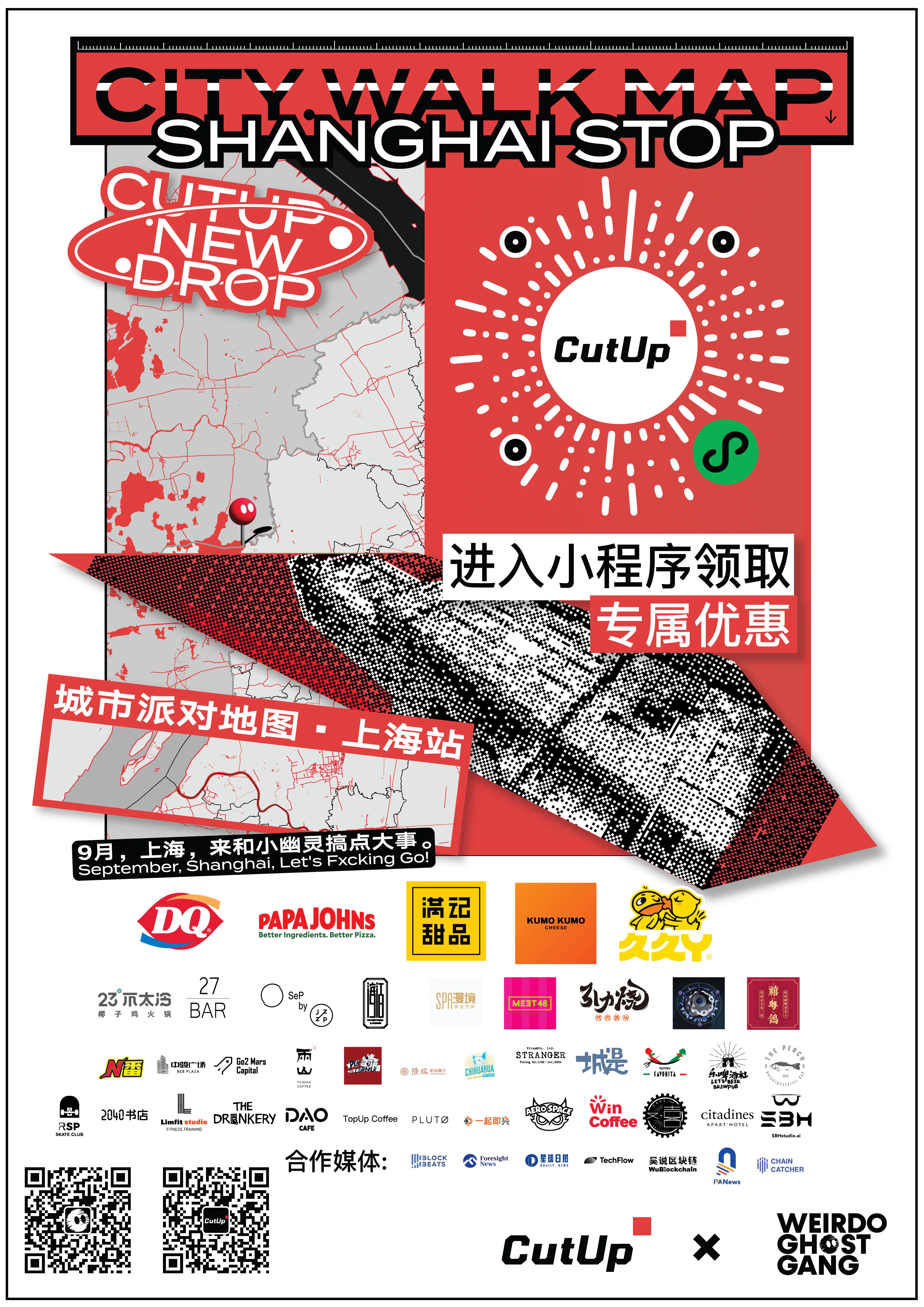
Weirdo Ghost Gang, a small group of influencers, has teamed up with over 500 well-known brand stores to launch a special event in Shanghai.
This event has a wide range of partners, covering ice cream, desserts, hotels, restaurants, bars, coffee, idol performances, health spas, and more. There are up to a hundred large chain brands and independent shops in Shanghai participating in this event, including DQ, Papa John's, KUMO KUMO, Honeymoon Dessert, Jiujiuya, Xintingting Apartment Hotel, and other brands.
How to more closely integrate Web3 with real life has always been a topic explored by ManesLAB, the parent company of Little Ghost WGG in the encryption industry. In this event, the ManesLAB team implemented user Web3 identity recognition through its developed Web3 middleware MID, and connected it with CutUp's WeChat mini program, allowing users to smoothly participate in some Web3 functions through the most frequently used social software in daily life. Participants in this event will be divided into three levels: "ordinary users", "Web3ers", and "Little Ghost WGG holders" based on whether they hold NFTs or Little Ghost WGG NFTs, and each level can receive corresponding benefits. Even if users do not hold Little Ghost WGG NFTs or any NFTs, they can still participate in the event.
The limited discount benefits provided by the cooperative brands of the "City Party Map Shanghai Station" are deeply loved by consumers, such as the "buy one get one free" benefit of the large cup Blizzard at seven DQ image stores in Shanghai, the "first cup + 1 yuan for the second cup" benefit provided by Double Win Coffee, a local chain coffee shop in Shanghai, the "15% off for the whole store" benefit at all stores of Jiujiuya in Shanghai, and the "second cup of Yangzhi Ganlu at half price" benefit available at all mainland stores of Manji Dessert. More benefits can be explored and discovered in the CutUp mini program map.
Here is a tutorial on how to bind Web3 identity with CutUp WeChat mini program in different scenarios. Follow the instructions to participate in the activity and enjoy various benefits.
How to bind MID to unlock Web3er/Ghost coupons
If you are an NFT holder and want to claim and use "Web3er coupon" or "Ghost coupon" in the mini program, you need to authorize through connecting MID to check if you meet the requirements for claiming. Users can complete MID authorization binding in four different scenarios as follows:
For a better wallet binding experience, ManesLAB recommends users to perform wallet binding operations on the MID desktop web page.
Scenario A: No CutUp account, no MID account
1. Go to the CutUp official website and register an account using your email address. The website can be found at https://cutup.store/home.
2. Afterwards, go to the MID website and register for a MID account using the same email as your CutUp account. You can refer to the user guide on "Creating a MID Account" and "Binding a Digital Wallet Tutorial" to bind your digital wallet.
3. Go to the mini program - log in with your email, or bind your CutUp account after logging in with WeChat.
For a better wallet binding experience, ManesLAB recommends users to perform wallet binding operations on the desktop web page.
Scenario B: No CutUp account, but already have MID account
1. Make sure you have bound a digital wallet in MID, please refer to the operation guide "Digital Wallet Binding Tutorial".
2. Go to the Mini Program - WeChat Quick Login - Unbind
3. Go to Account - Bind MID, and log in to MID on the login page.
Scenario C: Already have a CutUp account, but no MID account yet
1. Go to the MID website and register for a MID account using the same email as your CutUp account. You can refer to the "Creating a MID Account" guide and the "Binding a Digital Wallet Tutorial" to bind your digital wallet.
2. Go to the mini program - log in with your email, or bind your CutUp account after logging in quickly with WeChat.
If your CutUp account was created through MID authorization login, you may not be aware of the password for your CutUp account. In this case, you can reset your password through the "Forgot Password" option on the CutUp official website.If the user chooses to log in quickly with WeChat and already has a CutUp account, please be sure to complete the CutUp account binding step within the mini program. Otherwise, the newly created account cannot be merged with the user's old account.
Scenario D: Already have a CutUp account and a MID account
1. Make sure you have bound a digital wallet in MID, please refer to the operation guide "Digital Wallet Binding Tutorial".
2. Go to the mini program - log in with your email, or bind your CutUp account after logging in quickly with WeChat.
If your CutUp account was created through MID authorization login, you may not be aware of the password for your CutUp account. In this case, you can reset your password through the "Forgot Password" option on the CutUp official website.
If the user chooses to log in quickly with WeChat and already has a CutUp account, please be sure to complete the CutUp account binding step within the mini program. Otherwise, the newly created account cannot be merged with the user's old account.
已完成绑定,但是在个人主页没有看到 MID 数据更新?
Already bound, but no MID data update is seen on the personal page?
Please pull down to refresh on the "Account" page.
This is the first large-scale offline event hosted by an NFT project, which not only means that WGG, CutUp, and ManesLAB will gain greater exposure, but also signifies that someone is beginning to try to bring Web3 into reality in a more compliant way that is more suitable for the Chinese region. The convergence of culture, technology, economy, and other aspects will inevitably provide more diverse and inclusive cognitive perspectives for more people, making Web3 no longer a mysterious story, but a variety of applications that penetrate urban living spaces, linking people with people through brands, linking people with values through products, and linking people with experiences through scenarios.
Welcome to join the official BlockBeats community:
Telegram Subscription Group: https://t.me/theblockbeats
Telegram Discussion Group: https://t.me/BlockBeats_App
Official Twitter Account: https://twitter.com/BlockBeatsAsia
 Related Articles