Simple Introduction to Solidity|Lecture 29: Function Selector Selector
Original title: " A minimalist introduction to Solidity: 29. Function selector Selector "
Original author: 0xAA
I recently re- Learn solidity, consolidate the details, and write an "Introduction to Solidity Minimalist" for beginners (programmers can find another tutorial), update 1-3 lectures every week.
All codes and tutorials are open source on github: github.com/AmazingAng/WTFSolidity
selector
When we call the function of the smart contract, the first 4 bytes of the bytecode sent are the selector (function selector). In this lecture, we will introduce what selector is and how to use it.
msg.data
msg.data is a global variable in solidity, the value is The full calldata (the bytecode of the calling function).
In the following code, we can use the Log event to output the calldata that calls the mint function:

When the parameter is 0x2c44b726ADF1963cA47Af88B284C06f30380fC78, The output calldata is

This messy bytecode can be divided into two parts:
< /p>

In fact, calldata is to tell the smart contract which function I want to call and what the parameters are.
Function signature and selector
selector is defined as the first 4 hashes of the function signature bytes, so what is the function signature?
In fact, in Lecture 21, we briefly introduced the function signature, which is "function name (parameter types separated by commas)". For example, the function signature of mint in the code above is "mint(address)". In smart contracts, different functions have different function signatures, so we can use the function signature to determine which function to call.
Note that in the function signature, uint and int should be written as uint256 and int256.
We write a function to verify whether the selector of the mint function is 0x6a627842. You can run the function below to see the result.

Using selector
We can use the selector to call the target function. For example, if I want to call the mint function, I only need to use abi.encodeWithSelector to package and encode the selector and parameters of the mint function and pass it to the call function:
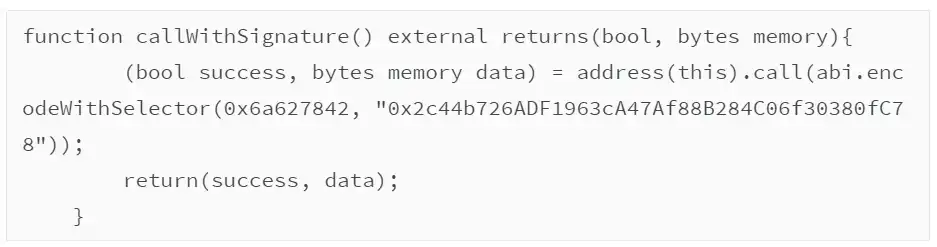
In the log, we can see that the mint function is successfully called and the Log event is output.
Summary
In this lecture, we introduced what is a function selector (selector) , its relationship with msg.data, function signature, and how to use it to call the target function.
Original link
Welcome to join the official BlockBeats community:
Telegram Subscription Group: https://t.me/theblockbeats
Telegram Discussion Group: https://t.me/BlockBeats_App
Official Twitter Account: https://twitter.com/BlockBeatsAsia

 Related Articles