Web3 Anti-Scam Guide: Security Skills All Discord Users, Operators, and Developers Should Know
Original title: "Comprehensive Analysis of Discord Security Issues"
Original author: Xing< /a>
Recently, I have seen frequent security issues in Discord. Ordinary users, transformed into operators of the Discord community, have also become developers of the Discord ecosystem, so this article takes Discord security as the theme to share with you the security issues on Discord.
In fact, Discord’s security issues have been criticized for a long time, but this cannot be completely blamed on Discord, because Discord is too open, just like the original Android , any APP can obtain almost all permissions of the system, so if any APP has a security risk, then the entire system will have a security risk. As mentioned above, the three roles of Discord (ordinary users, operators, and developers) will lead to security problems if any party fails to pay attention to security.
Safety is no small matter, I hope this article can help readers of the above three roles.
For ordinary users
The loss of users on Discord is mainly due to phishing on Discord There is too much information on the website, so for ordinary users, in order to avoid being phished, you need to pay attention to the following points:
Close private messages
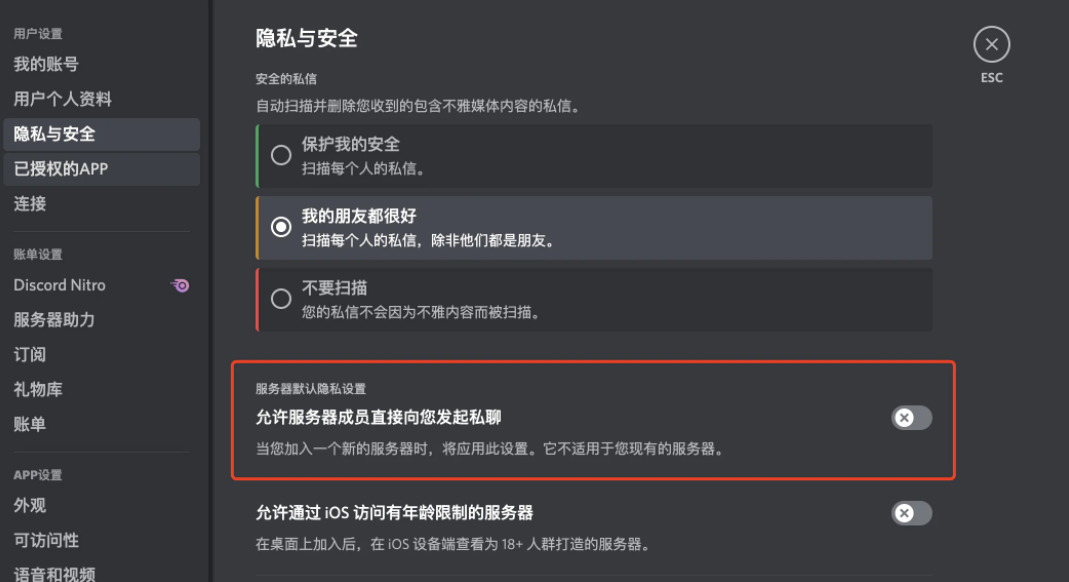
Close private chat
If this option is turned on, members of Discord can initiate a private chat with you directly, and the avatars and accounts of these members may be viewed with you in Discord If the administrator you got is exactly the same, then you may relax your vigilance and trust this account, so when they send you a link, you may be successfully phished.
In addition, you need to pay attention to friend requests. Recently, I asked a question in OpenSea's Discord, and the result is that the profile picture and account number are exactly the same as the account of the Discord administrator. Add friends, just ignore this situation.
Do not click on any unknown links
< img src="https://image.blockbeats.cn/upload/2022-05-20/462a43b8e7fc1f82731bef9e72e689a1b06df165.png?x-oss-process=image/quality,q_50/format,webp">
Phishing message pretending to be an official announcement
This screenshot is a message in OpenSea’s official Discord, to the effect that OpenSea wants to YouTube cooperates to issue NFT, and there are only 100 free places. Novice users may immediately FOMO when they see this news. After clicking the link in the screenshot, the website they see looks like this.

Phishing website
Seeing that the domain name and website are fine, thinking that there are only 100 quotas, you may click Claim to grab Mint, but after executing the transaction, your NFT will be lost.
So when you see this kind of news, you must be vigilant. Generally speaking, when each project party issues NFT, it will release the news in advance. This kind of sudden telling you to release NFT news is generally fake.
How to judge a phishing website
Sometimes in Discord no matter who sent it Links (may be links sent by group friends, administrators, robots), before clicking, you need to check whether the domain name you visit is the official domain name of the project. If not, you need to be very vigilant after clicking to enter:
If the website evokes the MetaMask pop-up window and only asks to view your wallet address, it is safe, such as the following picture:
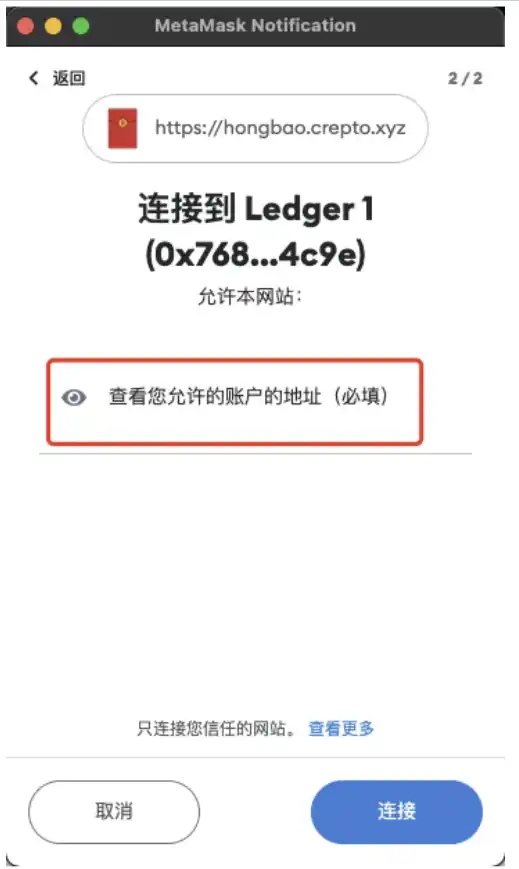
Get permission to view your wallet address
This operation is just Authorize the website to view your wallet address, and will not perform other operations on your assets.
When you continue to browse on this website and need to perform wallet-related operations, you need to pay special attention. Generally, there are several MetaMasks that arouse you on the website: Operation Type:
Transfer
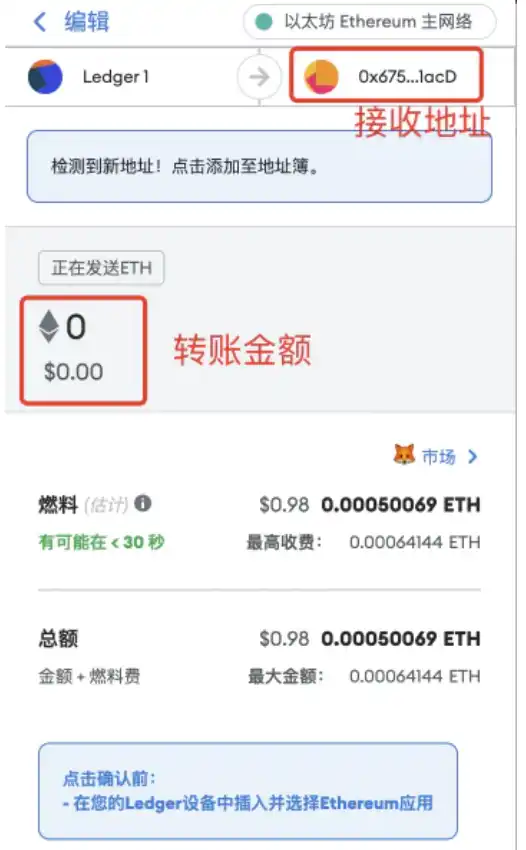
MetaMask pop-up window when transferring money
If the website wakes up the transfer on the screenshot Request, you need to pay attention to whether the destination address of the transfer is the address you want to transfer out, and whether the amount of transfer is correct.
It is relatively simple for transfer, just confirm the receiving address and amount.
Signature
Generally get a signature The purpose is to prove that you own the wallet address. For example, there is a robot named Collabland in Discord. It verifies that you own the wallet address by signature, and that the wallet address has the NFT. After the verification is passed, it will give you a Holder authentication.

CollabLand signature content when verifying identity< p>
If the content of the signature you see is readable in plain text, there is no problem. You can understand what this passage means. But pay attention to random signatures will also lead to asset loss.

OpenSea signature content when placing a sell order< p>
But if you see the content of the signature like the screenshot above, and you don’t understand what it is, don’t do it. Because the signature content of the above pop-up window is the signature of OpenSea’s sell order, but the price of the sell order may be set to 0.001E by the attacker. If you accidentally sign this on a phishing website, your NFT may be sold at a low price to Angler.
So there is a general principle for signing messages, sign if you understand it, don't sign if you don't understand it.
Contract call
Everyone is in many websites More cases encountered on the Internet are contract calls, such as mint NFT and other operations.


If it is a contract call, the first thing you need to determine is whether the called "contract address" is the officially announced contract address, and then look at the call after confirming that there is no problem with the contract address For the "function type" of the contract, if the "call function" type displays the words approve, setApprovalForAll, transfer, safeTransferFrom, etc., you need to be vigilant, because this is the authorization to allow others to transfer your assets, which is also the most common way of fishing.
The above-mentioned phishing URLs sent by OpenSea’s Discord being attacked, as well as the cases shared by me on Twitter below are all in this way.
So the general principle for contract calling is: confirm the contract address Correct, confirm that the operation type is not approve, setApprovalForAll, transfer, safeTransferFrom, etc.
For operators
For most scenarios, ordinary users can avoid It’s a pit, but as the operator of Discord, we need to protect the safety of community members more than ordinary users, so as to avoid the loss of users due to the operator’s security negligence. For Discord operators, there are also the following points to note:
Enable 2FA
If 2FA is not enabled, once the account password is leaked, the attacker can use the administrator's account to post phishing information.
Don’t click unfamiliar links
At present, there are phishing websites for Discord administrators, After the administrator enters the website and is guided, the attacker will get the administrator's Discord session. The attacker can use the session to bypass 2FA and login verification, and directly take over the Discord community as an administrator. The tweet below has a detailed analysis, interested friends can take a look.

Introduce as few Bots as possible
For every Bot added to the community, it will bring For an extra security risk, any Bot exploited by an attacker can launch a SCAM attack on the Discord of the community.
Crepto community only introduced an external Bot, CollabLand, to verify the identity of the holder, after all, it is already a standard configuration of Discord. If other Bots are not necessary, the Crepto community will no longer introduce them.
The authority to import Bot is too large
When Discord administrator introduces Bot, he needs to pay attention to Bot The requested server permissions adhere to the principle of least authorization. If you find a Bot with simple functions that requires administrator permissions, it is best not to introduce it. Because if the project side of this Bot is attacked, at least it will just send spam to your Discord community, and at worst it can kick out all users, delete all channels and records.

Server permissions requested by CollabLand
The above is the request for server permissions when CollabLand Bot is introduced. CollabLand Bot requires the authorization of the highest authority of "administrator". The role of CollabLand Bot is to grant a certain role to the authenticated holder. In fact, CollabLand Bot only needs to ask for the permission to manage Member and Role, but I don’t know why it asks for the highest permission? I also hope that friends who know will let me know.
So for Discord managers, the security of Discord mainly lies in:
- The security of the administrator account
- Bot security
The security of the administrator account can be guaranteed by the team’s increased security awareness, but Bot security is powerless for managers, so managers can only deal with it by adhering to the principle of using less Bots if they can be used less, and granting less authorization if they can.
For developers
Crepto community has developed two Discord Bots The development of Discord has some understanding. Therefore, for friends who develop on Discord, the following safety suggestions are also given:
Bot’s Token must be safe
< p>The developers of Discord know that the lifeline of a Bot lies in the Token. After the Token is obtained by the attacker, the attacker can use your Bot to do whatever he wants , so you must pay attention to the Bot's Token as you do to the security of the wallet private key.
Security of the server running the Bot
The topic of server security can be expanded infinitely, but here is As a reminder, the security of the Bot Token is very important. The Bot runs on the server, so the server is compromised, which means that the Token is also leaked, and of course all the data on Discord obtained by the Bot is also leaked.
Cultivate the habit of regularly changing Token
Just like some websites that require users to change their passwords regularly Similarly, although Discord does not require developers to regularly change the Bot's Token, I think it is essential to develop a regular Token change, especially when you have a large number of Bot users.

Regularly replace Bot Token by Reset
Bot asks for permissions on demand
< /p>
Don't ask for the "Administrator" permission of the Discord server, confirm which functions your Bot needs to use, and then ask for the corresponding permission. In this way, even if your Bot is hacked, the degree of damage will be controlled within a certain range.
The general principle for developers is to ensure the safety of Bot Token, and to minimize the request for your Bot permissions.
Original link
Welcome to join the official BlockBeats community:
Telegram Subscription Group: https://t.me/theblockbeats
Telegram Discussion Group: https://t.me/BlockBeats_App
Official Twitter Account: https://twitter.com/BlockBeatsAsia
 Related Articles