Evmos airdrop text and text receive tutorial
DeFi100
Original author: 0xcF22
This chain is EVM-compatible, and after attracting EVM developers into the ecosystem, the operational goal of the chain is to connect IBC assets with EVM assets.
So, from the design of the airdrop mission, the primary goal should be to guide the EVM user to the IBC using Cosmos.
Airdrop Pickup has four missions that unlock 25% of airdrops each:
1. IBC transfer, 25%
2. Pledge EVMOS to the node, 25%
3, governance voting, 25%
4. EVM, 25%
Defi100 Flow actions shared by Discord group friends Alan and TokyoSunDog)
The screenshot is attached below to introduce the detailed operation process:
1. Prerequisites: Keplr wallet plug-in with Osmosis Token
Keplr is the most used browser plug-in wallet in the Cosmos chain.Keplr.app
Osmosis 的 Token (OSMO),可以在 Cosmos 生态多链交易平台购买。有两种简单途径换取 OSMO:
Method 1: If you have played Terra, you can go to the App.osmosis. Zone/Assets page and Deposit UST or LUNA directly, then go to Trade and change to OSMO directly. The process is similar to centralized transaction depositing.
Method 2: Buy ATOM from each exchange platform and withdraw money to the Cosmos Hub chain address, then Trade and change OSMO using Osmosis (app.osmosis. Zone/Assets) Deposit.
The Deposit operation mentioned in the above two methods is equivalent to the Deposit of CEX, which is itself an IBC transfer.
Most OF the IBC transfers in the Cosmos chain are done this way, on a web page, and are extremely silky. The IBC transfer mentioned later in this paper is actually an advanced function, which is seldom used at ordinary times. It is only used in the case that the front-end UI does not come out, in order to jump the gun, in order to early air space investment. The actual IBC is less complicated.
2. Find the wallet address of the Evmos chain:
(1) Cosmos Ecological Airdrop Users:
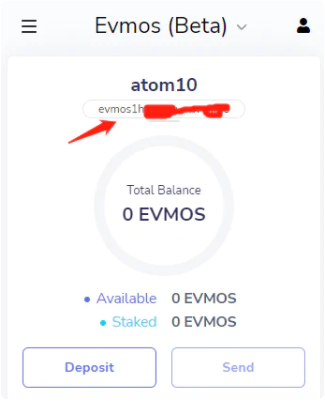
Keplr wallet, cut to the Evmos chain, copy the Evmos chain address
(2) Ethereum airdrop method for users to find Evmos address
Enter & have spenthttps://evmos.disperze.network/
Connect to fox, two wallets will be displayed in the lower left corner, with Evmos & NBSP above the Ethereum address; Address, click Copy.
3. IBC transfer
(1) Cut back to the Osmos chain and pull down to find IBC Transfer
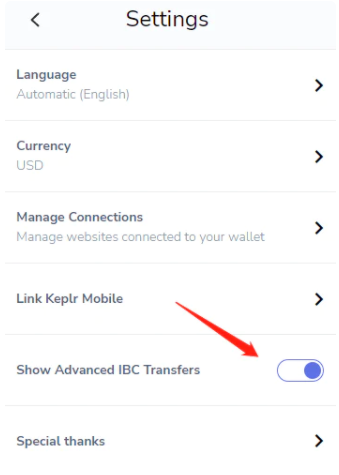
If you don't have this button, you can go to The Keplr wallet and find Setting to enable IBC.
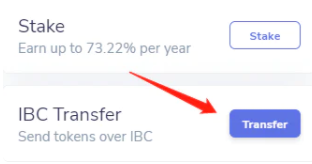
If you don't have this button, you can go to The Keplr wallet and find Setting to enable IBC. (Using IBC in wallets is complicated, and the developers have disabled it by default to avoid misuse. Normal IBC transactions are done in the web UI and are very slippery.
(2) Drop down and select New IBC Transfer Channel
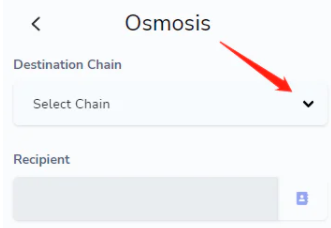
(3) Select Evmos(Beta) for the target chain and fill in channel ID: channel-204
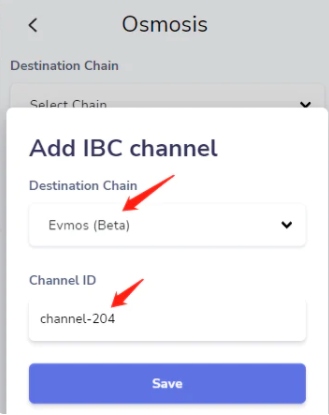
(4) Return and start transferring money to the newly added target chain
Select the Evmos(Beta) chain, fill in the Evmos wallet address you just copied, and click Next.
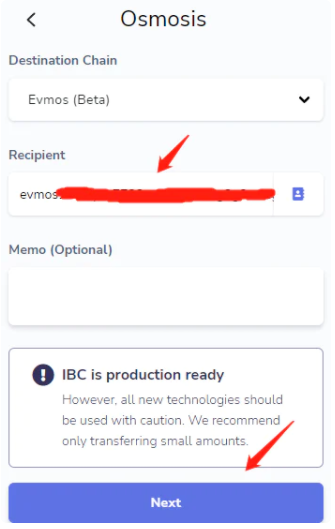
(5) Select the amount, such as 0.1, and click Confirm
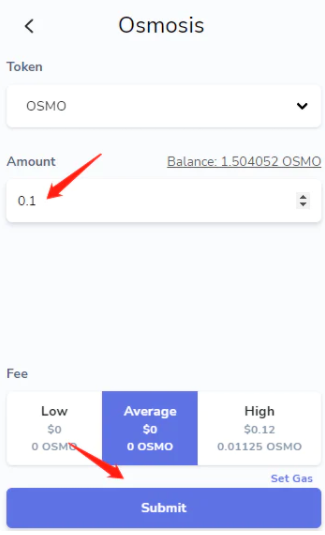
This completes the transfer from Osmosis chain to Evmos chain IBC.
Return to the wallet main interface, switch to Evmos, at this time, you can see the balance of Evmos in the wallet
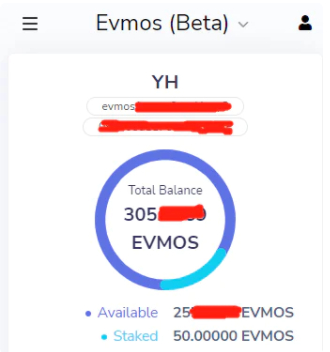
4. Pledge and vote
(1) Pledge website:
https://evmos.disperze.network/validatorsOr, wallet. Keplr. # / evmos/app/gaining
Select a node and complete the pledge operation (the number is unlimited).
Nodes can be selected after 20 (to facilitate decentralization, some projects will avoid the top 10 nodes when airdropped).
(2) Governance voting website:
https://evmos.disperze.network/proposals Or wallet. Keplr. # / evmos/app/governance
Select the latest proposal and complete the voting operation.
After the above steps, you can unlock three tasks and claim 75% of the EVMOS Token.
另有第 4 个任务(25% 的 Token )是使用 EVM,需要等待有可用的 EVM 链应用之后再操作。
The original link
Welcome to join the official BlockBeats community:
Telegram Subscription Group: https://t.me/theblockbeats
Telegram Discussion Group: https://t.me/BlockBeats_App
Official Twitter Account: https://twitter.com/BlockBeatsAsia
 Related Articles