Decentralized interest rate platform Strips Finance trading and liquidity mining rules and tutorials
Original title: "Strips Opens Liquidity Mining / Transaction Mining"
Original source: StripsFinance
Detailed rules for mining rewards:

Strips Economic Model
Transaction mining rewards are allocated to each Market. Every time a trader opens a new position, it accumulates:
Cumulative transaction position + = |position| (1 + LP pledged by trader / total number of LP pledged)

AMM Cumulative Position + = |Position|(1+ Trader Pledged LP / Total LP Pledged)

In the above formula, (1 + trader mortgage LP / total LP mortgage) is the promotion multiplier for transaction mining. This is used to increase the returns of traders on the same market. Participating in staking while trading will get the most rewards, so we encourage everyone to trade and staking at the same time.
Transaction reward APY%

For each AMM market, each trader will share trading rewards based on their accumulated effective trading volume .
We may press The allocation of transaction rewards will be reevaluated monthly. Initially, rewards allocated to transaction mining, AMM staking, and insurance pools will be distributed in a ratio of 1:1:1.5
Traders will accumulate trading rewards based on their non-wash trading volume. The total transaction rewards for all AMM markets will be approximately 13,328,285 STRP Tokens, accounting for 13.3% of the total STRP supply.
In each market, staking users (Stakers) will accumulate staking rewards proportional to their staking amount. All AMM markets The total staking rewards will be approximately 13,328,285 STRPTokens, accounting for 13.3% of the total STRP supply.
The total staking rewards allocated to the insurance pool will last for three years, approximately 19,992,428 STRPTokens, accounting for 19.9% of the total STRP supply.
Assignment schedule and distribution Proportions may vary depending on the stage of development of the protocol.
Trading volume is accumulated and reset daily. At the end of each day, the cumulative volume for each trader and the total cumulative volume for the market will be reset to zero. There are several reasons for this design:
First, if the reward system Being abused, the next round of rewards can be readjusted quickly.
Secondly, we want to encourage fair use of our protocol, and in Create a level playing field on Strips. In order to do this, it is more fair to update the reward accumulation every day.
Once a trader stops trading on Strips for more than 1 day, the trade Members will no longer receive any transaction rewards.
In summary, the more a user trades and bets on Strips, the more he/she will The more rewards you get. Traders will receive the same rewards as those who participate in staking, and participants who participate in both staking and trading will receive the most rewards. (Traders can use leverage to increase their trading volume, thereby increasing trading returns.)
Wash trading (wash trading)
In order to encourage a healthy market and prevent transaction volume, each Transactions need to hold at least 10 blocks to be rewarded.
When every trader When a position is closed or partially closed or is forced,
We will update: transaction interval = current block last transaction block
Trader
If the transaction interval is less than 10 blocks, then we will The category is wash trading, and the transaction reward for this transaction is 0. If the transaction interval is greater than 10 blocks, the cumulative transaction volume of the trader will increase as usual.
AMM
< /p>
AMM includes all transactions in its cumulative transaction volume. Since wash trades still pay transaction fees to LP holders, these volumes are still valid. Therefore, wash trading benefits LP holders while punishing wash trading.
We will monitor the speed of Token distribution: wash trading will not be rewarded with STRP.
Part Two "Tutorial Part":
< p>Set up Arbitrum network
In order to stake Strips, you must first connect your STRP and USDC to the Arbitrum mainnet. Follow the guide below
Add Arbitrum Another (fastest) way to get to your metamask wallet is to go to https://app.strips.finance and connect your metamask wallet.
Add token to your metamask wallet (guide here):
< /p>
STRP(Aribitrum): 0x326c33fd1113c1f29b35b4407f3d6312a8518431
USDC (Aribitrum) : 0xff970a61a04b1ca14834a43f5de4533ebddb5cc8
< p ql-global-para="true" line="wkix">Step 1 - Add Arbitrum Network
Another (fastest) way to add Arbitrum to your metamask wallet is to visit https://app.strips.finance and connect your metamask wallet.
Alternatively, you can set network in metamask wallet and add network details and fill in the details:
Network Name: Arbitrum Mainnet
New RPC URL: https://arb1.arbitrum.io/rpc
Chain number: 42161
Symbol: ETH
Block Explorer URL: https://arbiscan.io/
< /p>
Step 2 - Connect Ethereum to Arbitrum
Go to https: //bridge.arbitrum.io/ and switch to Ethereum mainnet network

Enter the amount of ETH you want to cross-chain to Arbitrum, then click Deposit

Transactions take about 10-15 minutes to complete.
Switch to the Arbitrum mainnet network and your ETH should show up in your wallet.
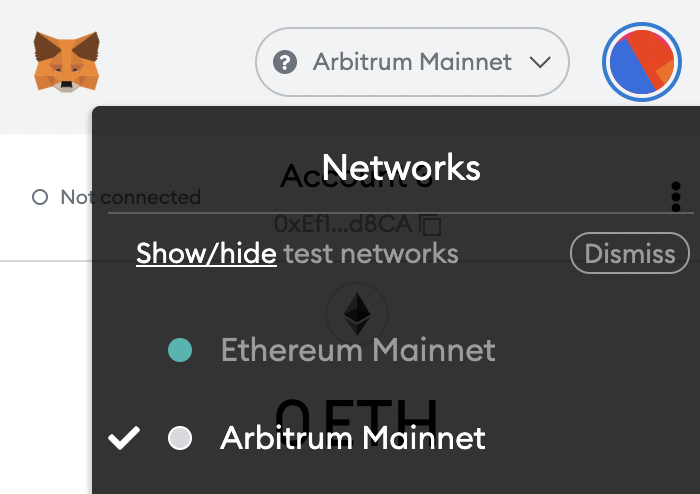
Step 3 - Cross-chain USDC or STRP to Arbitrum
Once you have successfully cross-chained some ETH to Arbitrum, you can cross-chain USDC and STRP to Arbitrum to start trading and staking on Strips.

Go to https://bridge.arbitrum.io/ ; and switch to the Ethereum mainnet network select Token Select STRP or USDC from the Token list and repeat step 2
The transaction takes approximately 10-15 minutes to complete.
Switch to the Arbitrum mainnet network and your STRP should show up in your wallet.
Stake on strips
Before you can stake your STRP-USDC LPToken to receive $STRP rewards, you must first own the LPToken. To obtain STRP-USDC LPTokens, you must first provide liquidity to the STRP-USDC liquidity pool on Arbitrum. Please note that only STRP-USDC LP staked on Arbitrum can be accepted as a stake token!
Here is how to do all Guidelines for these actions:
Add liquidity to STRP-USfDC pool (Arbitrum)
To add liquidity to SushiSwap STRP-USDC pool (Arbitrum), please follow these steps:
- switch your network to Arbitrum
- go to SushiSwap's add liquidity page to specify that you want to contribute to the liquidity pool How much STRP-USDC to add
- Remember that when you provide liquidity, the total value of both assets should be in an equal 50:50 ratio
- if this The first time you are providing liquidity for these assets on SushiSwap, please click "Approve STRP" and you should get a popup notification in your Web3 wallet to accept the transaction
< /p>

< br>
A popup will appear showing the LPToken you will receive. Click "Confirm Supply"
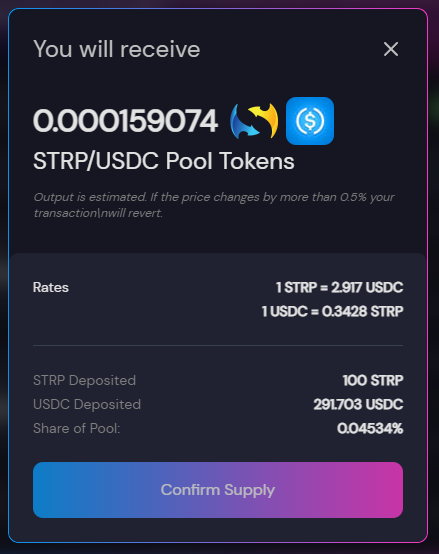
Click OK on your Web3 wallet

Your LPToken and pool shares will be displayed at the bottom of the SushiSwap liquidity page
< /p>

< br>
Stake STRP-USDC LP Token
To pledge SushiSwap STRP-USDC LPToken, Please follow the steps below:
Enter the pledge page and click on the STRP-USDC pledge pool of your choice< /p>

Specify the amount of Token you want to stake, and click Deposit.
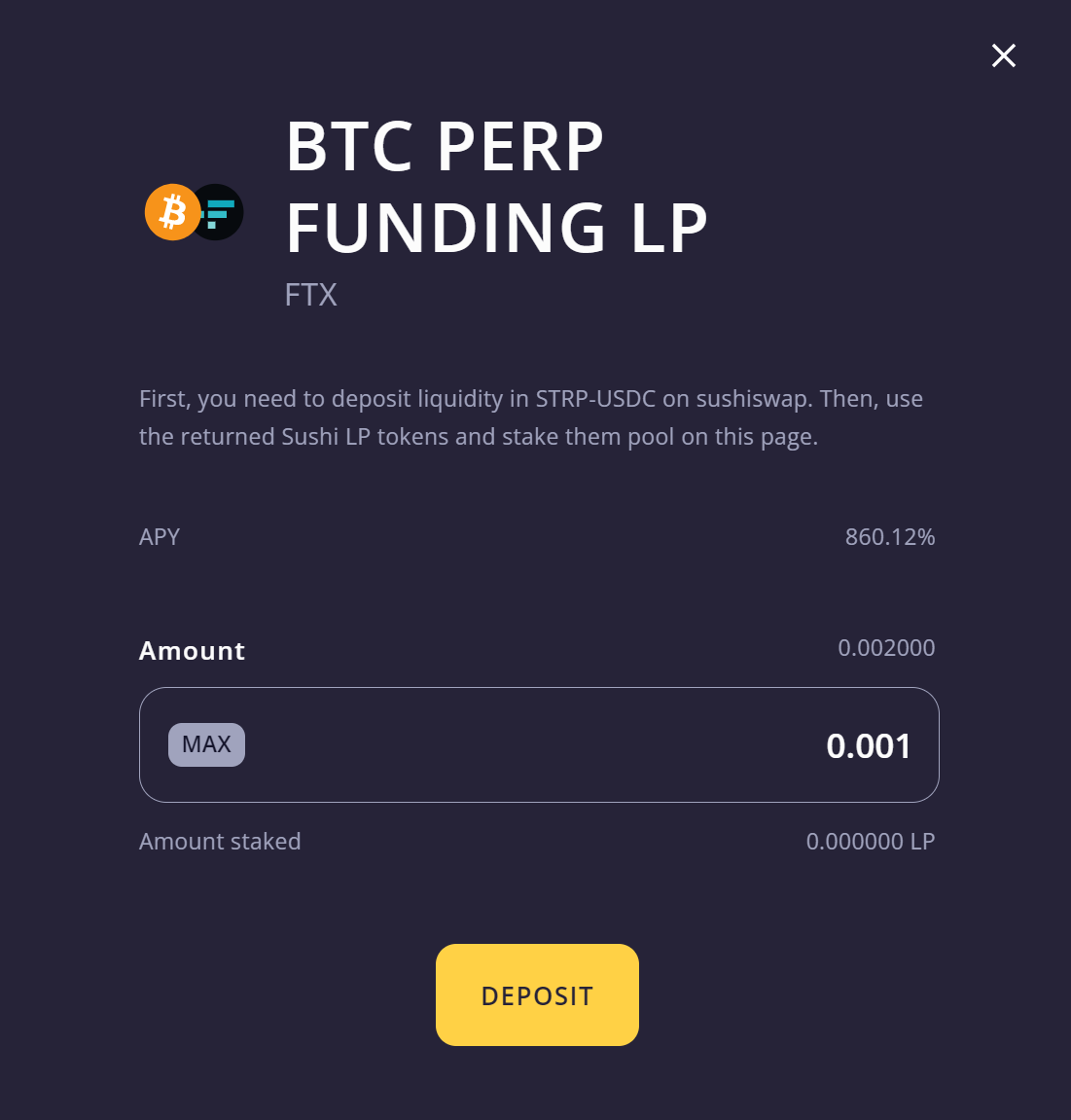
After clicking deposit, you should be in your Web3 wallet Receive a pop-up notification in to accept the transaction. Click Confirm and wait for the transaction to be processed.
You are now earning STRP rewards!
Receive STRP reward
To claim your STRP rewards, please follow these steps:
Enter the pledge page and click the claim button in the upper right corner of the page
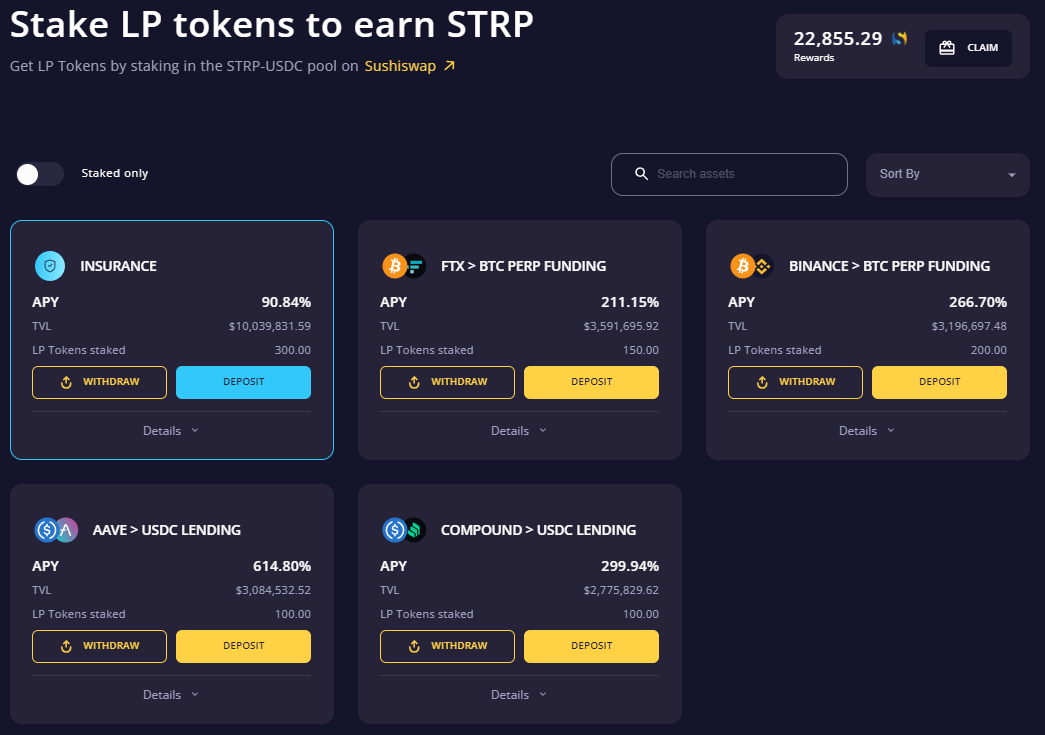
Click OK on your web3 wallet. You have now claimed your STRP rewards!
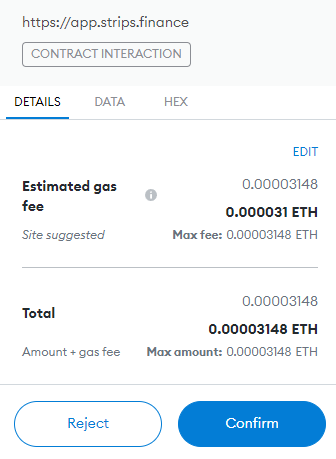
Strips transaction
Transaction Screen
On the transaction screen, each area represents different information related to your transaction.
Drop down to display market menu current market information trader position input pane market order history pane current trader position pane price chart

Pull down to display the market menu
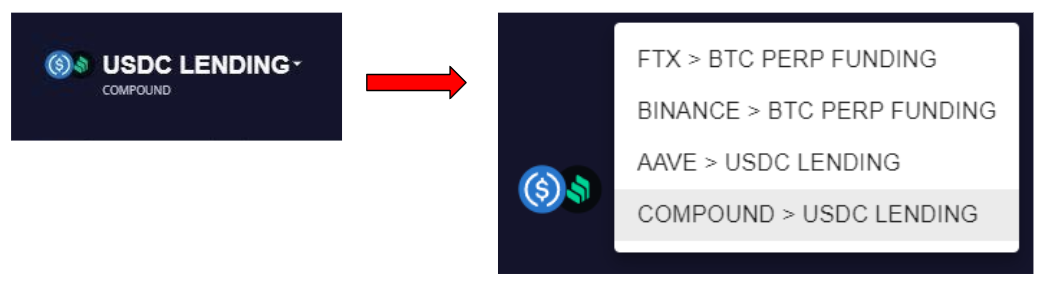
Click and Scroll to choose from different market options
Important relevant market information
Current market information shows the following information
Fixed Rate: Strips Finance's current "fixed" market rate offer.
Floating Rate: The current exchange or agreement "floating" market rate quote.
TVL: The current total volume of liquid in the STRIPS AMM.
24HR trading volume: USDC trading volume in the current market.

Trader position input< /b>
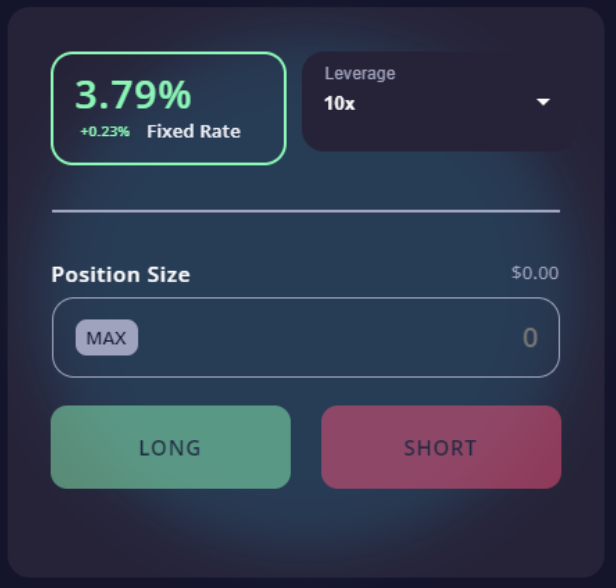
The trader position input section shows:
Fixed Rate: Strips Finance's current 'fixed' market rate quote.
Leverage menu: You can set the leverage from 1x to 10x. Remember that leverage can cause your collateral to be liquidated if your margin ratio is too high.
Position Size: This is the largest position you can hold depending on the leverage option you choose
Long: Enter a long position and pay the current fixed rate to get a variable rate.
Short: Enter a short position and pay the floating rate to get the current fixed rate.
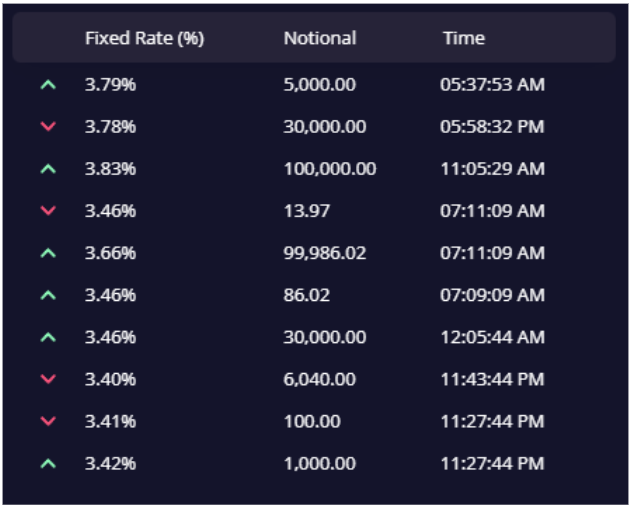
Order History
The Order History window shows previously completed market orders .
The fixed rate percentage shows the market rate at the time of entry. Notional shows the position amount at the time of entry .The green up arrow shows entered long positions. The red down arrow shows entered short positions.
 < /p>
Vacancy
The Open Positions screen displays information about your current open positions
Market: The market your position is in Market Rate: The current fixed market rate.
Floating Rate : The current floating market rate.
Notional: Your position size.
Side: The direction of the location you entered.
Avg Entry Price : The entry price of your position at the time of entry.
Margin Ratio: Your margin percentage. This is the ratio of your position size to your leverage. The lower the margin ratio, the greater your margin risk. If it's less than 5%, you're in danger of being liquidated. Unrealized PnL: The current PnL value you will get when you close your position.

Price Chart
Strips Finance offers price charts with the same tools as Tradingview .
The left column contains all basic charts from trendlines to Fibonacci retracement tools tool. Tradingview has a good tutorial on this. The top of the chart allows you to change the time period displayed, add metrics, add templates and screenshots. The chart shows a line chart of the market's historical prices/rates with volume indicators below it. The orange line represents the position entered by the market. You can zoom in/out by scrolling with the mouse on the graph.

Open position
To open a position, you must first hold USDC in your wallet.
Set leverage and enter desired position size. We want to be long, so we click the long button.
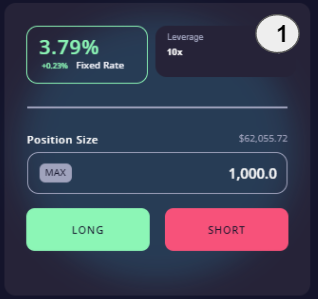
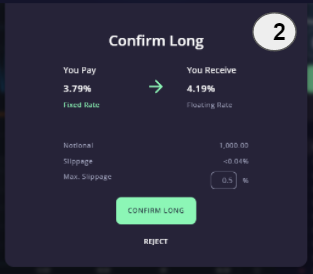
Pay attention to the popup window confirming your selection, then click OK for a long button.
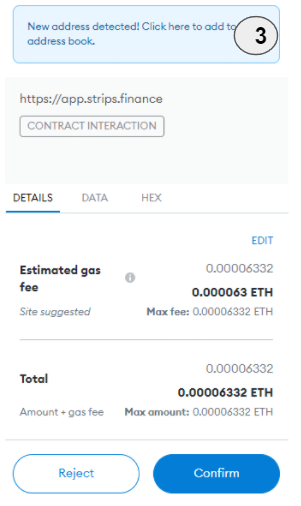
Your wallet will pop up requesting confirmation of your order. Click OK.
Your The position will be shown in the Open Positions section confirming your trade.

Close position
In order to close your position you have to go to the open positions section. In the open positions section you have to click the red close button.

Pay attention to the pop-up window giving you options. Enter the desired amount and hit level position. The maximum slippage must be less than the slippage that will occur.

Your wallet will pop up asking to confirm your order. Click OK to finish closing.
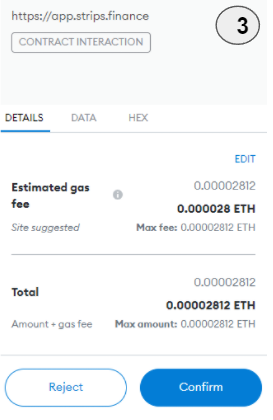
Note: Clearing Line
If your margin ratio is below 5%, your positions may be liquidated. You can find your liquidated positions in the "Liquidated Positions" tab of the position window.

Original link:
1. Mining rules: https://strips-finance.medium.com/strips- user-manual-step-by-step-instructions-to-bridge-stake-and-trade-258fe890a2f9
2. Tutorial: https://strips-finance.medium.com/strips-liquidity- farming-reward-design-explained-4a371d97f9ac
This article is from a contribution, It does not reflect the views of BlockBeats.
Welcome to join the official BlockBeats community:
Telegram Subscription Group: https://t.me/theblockbeats
Telegram Discussion Group: https://t.me/BlockBeats_App
Official Twitter Account: https://twitter.com/BlockBeatsAsia

 Related Articles